Contents
Contents
HttpTargetConnector TLS, SNI, and Keystore Troubleshooting
Step-by-step diagnostic and resolution guide for outbound HTTPS errors in PeopleSoft Integration Broker (HttpTargetConnector), including message catalog 158, 10721 (“Integration Gateway - External System Contact Error”), Server Name Indication (SNI) handshake terminations, trusting Root and Intermediate CA certificates in the pskey keystore with pskeymanager, and recovering asynchronous contracts stuck in PSNODESDOWN retry loops.
How Outbound HTTPS Connections Work in Integration Broker
When PeopleSoft acts as an HTTP client using HttpTargetConnector (either via a synchronous request, an asynchronous publication contract, or a Node Ping), the physical HTTPS connection is made by the Integration Gateway running on the PIA WebLogic web server (psft.pt8.pshttp.https.HttpsClient), not the Application Server.
  sequenceDiagram
    participant AppSrv as App Server / Pub-Sub (PSPUBDSP)
    participant IGW as Integration Gateway (WebLogic PSIGW)
    participant Keystore as Gateway Keystore (pskey)
    participant Ext as External HTTPS Endpoint (SNI / TLS)

    AppSrv->>IGW: IBInfo MIME Request (Target Node / Routing URL)
    Note over IGW: Checks ig.UseDomainName.ExternalOperationNames
    alt Operation NOT in UseDomainName list (Default)
        IGW->>Ext: DNS lookup -> Connects via raw IP (No SNI server_name)
        Ext-->>IGW: TCP FIN / TLS EOF (Remote host terminated handshake)
    else Operation & ping IN UseDomainName list
        IGW->>Ext: TLS ClientHello with SNI Hostname
        Ext-->>IGW: Server Certificate Chain
        IGW->>Keystore: Validate Root & Intermediate CA in pskey
        alt Certificate Chain Trusted
            IGW->>Ext: HTTP Request (POST or GET ping)
            Ext-->>IGW: HTTP 200 OK
        else Certificate Chain Untrusted
            IGW-->>AppSrv: SSLHandshakeException: Untrusted Server Certificate Chain
        end
    end
Because of this architecture, nearly every outbound HTTPS failure falls into one of three categories:
- SNI Handshake Termination: PeopleSoft connects using the resolved IP address instead of the domain name, so modern cloud load balancers (Cloudflare, AWS ALB/CloudFront, Azure Front Door, Nginx, etc.) drop the TLS handshake immediately.
- Untrusted Certificate Chain: The Integration Gateway does not use the OS truststore; its
pskeykeystore only trusts CAs explicitly imported viapskeymanager. - Stuck Asynchronous Retry Loop (
PSNODESDOWN): After a single outbound failure on an asynchronous routing, Integration Broker marks the node down inPSNODESDOWNand repeatedly sends anHTTP GET(<OperationType>ping</OperationType>) until it receives an HTTP200.
Reading errorLog.html to Identify the Exact Failure
Whenever you receive Message Set 158, Message ID 10721 (“Integration Gateway - External System Contact Error”), the UI message alone is too generic to tell you whether DNS, firewall, SNI, or certificate trust failed. Always inspect errorLog.html on the Integration Broker web server:
<PIA_HOME>/webserv/<DOMAIN>/applications/peoplesoft/PSIGW.war/WEB-INF/errorLog.html
158, 10721 errors in errorLog.html, PeopleSoft almost always populates MessageParms in the header and <Status> response block with <Parm>IOException: The host couldn't be resolved.</Parm>. This is a hardcoded default fallback parameter when HttpTargetConnector throws ExternalSystemContactException. Even when DNS resolves perfectly, this string is logged. Look at the Description field and Stack Trace textarea instead.Symptom Comparison Table
Description / Stack Trace in errorLog.html |
True Root Cause | Resolution |
|---|---|---|
HttpTargetConnector:ExternalSystemContactException Remote host terminated the handshakejavax.net.ssl.SSLHandshakeException: Remote host terminated the handshakeCaused by: java.io.EOFException: SSL peer shut down incorrectly |
SNI (Server Name Indication) missing. PeopleSoft connected by raw IP address instead of hostname; the remote server requires SNI and dropped the connection. | Add the external operation name and ping to ig.UseDomainName.ExternalOperationNames in integrationGateway.properties. |
javax.net.ssl.SSLHandshakeException: java.security.cert.CertificateException: Untrusted Server Certificate Chainor HttpTargetConnector:ExternalSystemContactException unknown certificate |
Missing Root / Intermediate CA certificate in the gateway keystore (pskey), or an expired certificate in the chain. |
Download the Root and Intermediate CA certificates and import them into pskey using pskeymanager, then restart WebLogic. |
java.net.UnknownHostException: <hostname> |
Actual DNS failure on the PIA web server. | Verify DNS resolution (nslookup / dig) from the PIA web server host, or check for a typo in the URL on PSNODECONPROP / PSRTNGDFNCONPRP. |
java.net.ConnectException: Connection timed out or Connection refused |
Firewall / network egress blocked from the PIA web server to the target host/port. | Test outbound connectivity (curl -Iv https://...) directly from the PIA web server and open egress firewall rules. |
Decoding the <Request> XML in errorLog.html
Each entry in errorLog.html includes a Request textarea containing the <IBInfo> XML sent from the application server to the gateway. Check four key elements in that XML:
<ExternalOperationName>— e.g.,<![CDATA[PERSON_BASIC_SYNC.INTERNAL]]>. This exact string is whatig.UseDomainName.ExternalOperationNamesmatches against.<OperationType>— e.g.,ping,sync, orasync. If you seepingrepeating every few minutes without anyone clicking “Ping Node”, Integration Broker is in aPSNODESDOWNretry loop.<DestinationNode>— the target node inPSMSGNODEDEFN.<ConnectorParameters>— the HTTPMethodandURLare URL-encoded inside<Value>tags (for example,%3c!%5bCDATA%5bhttps%3a%2f%2fapi.example.com%2fv1%2fwebhook%5d%5d%3edecodes to<![CDATA[https://api.example.com/v1/webhook]]>). Always URL-decode theURLvalue to verify which URL is actually being called (node-levelPSNODECONPROPvs. routing-levelPSRTNGDFNCONPRP).
Fixing SNI Handshake Errors (Remote host terminated the handshake)
By default, when psft.pt8.pshttp.https.HttpsClient opens an HTTPS connection, it resolves the hostname to an IP address first and uses the IP address for the socket connection. Because it connects by IP, Java’s SSL socket does not send the TLS server_name (SNI) extension in the ClientHello packet. Modern cloud providers and reverse proxies that host multiple TLS certificates behind a single IP address will immediately terminate the handshake with an EOF:
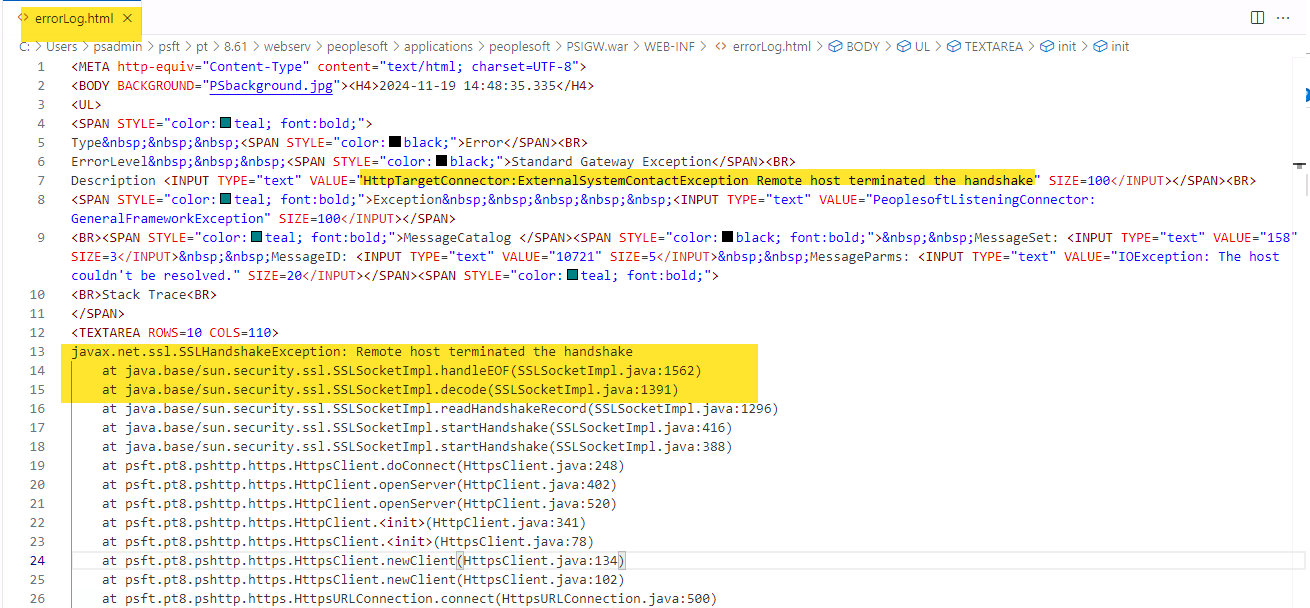
javax.net.ssl.SSLHandshakeException: Remote host terminated the handshake
	at java.base/sun.security.ssl.SSLSocketImpl.handleEOF(SSLSocketImpl.java:1562)
	at java.base/sun.security.ssl.SSLSocketImpl.decode(SSLSocketImpl.java:1391)
	at java.base/sun.security.ssl.SSLSocketImpl.readHandshakeRecord(SSLSocketImpl.java:1296)
	at java.base/sun.security.ssl.SSLSocketImpl.startHandshake(SSLSocketImpl.java:416)
	at psft.pt8.pshttp.https.HttpsClient.doConnect(HttpsClient.java:248)
Caused by: java.io.EOFException: SSL peer shut down incorrectly
Configure ig.UseDomainName.ExternalOperationNames
Edit integrationGateway.properties (either via PeopleTools > Integration Broker > Configuration > Gateways > Gateway Setup Properties > Advanced Properties Page, or on disk at <PIA_HOME>/webserv/<DOMAIN>/applications/peoplesoft/PSIGW.war/WEB-INF/integrationGateway.properties):
ig.UseDomainName.ExternalOperationNames=PERSON_BASIC_SYNC.INTERNAL,IB_GENERIC.V1,ping
Key rules for ig.UseDomainName.ExternalOperationNames:
- Provide a comma-separated list of external operation names (
<ExternalOperationName>fromerrorLog.html, which includes the version suffix such as.v1or.INTERNAL). - Always include
pingin the list. Both manual Node Pings and automated background retry checks use<OperationType>ping</OperationType>. Ifpingis omitted, manual node pings andPSNODESDOWNrecovery pings will continue to fail withRemote host terminated the handshakeeven if the operation itself is listed. - If you edit
integrationGateway.propertieson disk, restart the PIA web server (stopPIA/startPIA).
Trusting Root and Intermediate Certificates in pskey
Even after SNI is enabled, HttpTargetConnector will only trust certificates signed by a Certificate Authority present in the Integration Gateway’s pskey keystore (<PIA_HOME>/webserv/<DOMAIN>/piaconfig/keystore/pskey).
Download the Certificate Chain (Base-64 PEM Format)
You need the Root CA and any Intermediate CA certificates in Base-64 encoded X.509 (.cer or .pem) format. Generally, you only need to import the Root CA and Intermediate CA certificates, not the leaf server certificate itself (unless it is a self-signed certificate), so that routine leaf-certificate renewals from the same CA do not break your integration.
Option A — Using Java keytool or openssl on the Web Server (Recommended)
Run keytool from the command line to print the full certificate chain presented by the remote server in RFC/PEM format:
keytool -printcert -rfc -sslserver api.example.com:443 > full_chain.pem
(Alternatively, with OpenSSL: openssl s_client -connect api.example.com:443 -servername api.example.com -showcerts </dev/null)
Open full_chain.pem in a text editor. It will contain multiple -----BEGIN CERTIFICATE----- ... -----END CERTIFICATE----- blocks (the first is the leaf certificate, followed by Intermediate CA(s) and the Root CA). Save the Intermediate CA block as intermediate_ca.cer and the Root CA block as root_ca.cer.
Option B — Exporting from Chrome or Edge
- Browse to the target
https://URL in Chrome or Edge. - Click the tune / padlock icon in the address bar > Connection is secure > Certificate is valid.
- Select the Details tab.
- In the Certificate Hierarchy tree, click the top-level Root CA, click Export, and select Base64-encoded ASCII, single certificate (
*.pem,*.crt). - Select the Intermediate CA beneath the root, click Export, and save it as a separate Base64-encoded file.
Import the Certificates Using pskeymanager
Log in to the PIA WebLogic web server that hosts your Integration Gateway and navigate to the domain’s piabin directory:
# Linux
cd $PS_CFG_HOME/webserv/peoplesoft/piabin

# Windows
cd %PS_CFG_HOME%\webserv\peoplesoft\piabin
pskeymanager is a PeopleTools wrapper script around Java’s keytool that automatically targets <PIA_HOME>/webserv/<DOMAIN>/piaconfig/keystore/pskey.
First, verify you can read the keystore (the delivered default password is password):
# Linux
./pskeymanager.sh -list

# Windows
pskeymanager.cmd -list
Next, import the Root CA and Intermediate CA certificates using distinct -alias names:
# Linux - Import Root CA
./pskeymanager.sh -import -alias example_root_ca -file /path/to/root_ca.cer

# Linux - Import Intermediate CA
./pskeymanager.sh -import -alias example_intermediate_ca -file /path/to/intermediate_ca.cer
REM Windows - Import Root CA
pskeymanager.cmd -import -alias example_root_ca -file C:\path\to\root_ca.cer

REM Windows - Import Intermediate CA
pskeymanager.cmd -import -alias example_intermediate_ca -file C:\path\to\intermediate_ca.cer
When prompted by pskeymanager:
- Enter the keystore password (default
password). - Type
yesat theTrust this certificate? [no]:prompt.
Automated Windows PowerShell Script (Download, Split, and Import)
Save the following PowerShell script as Import-PsftTlsChain.ps1 on your PeopleSoft Windows web server and run it from piabin (or pass -PiaBinPath). It prompts for the target hostname, alias prefix, and pskey keystore password up front, downloads the TLS chain via keytool -printcert -rfc -sslserver, splits out the Intermediate and Root CA certificates into individual .cer files, and imports each into pskey via pskeymanager.cmd without further interactive prompts:
# Import-PsftTlsChain.ps1
# Downloads a remote HTTPS server's certificate chain, splits the Intermediate and Root CA
# certificates into PEM files, and imports them into the PeopleSoft Integration Broker pskey keystore.

param(
    [string]$TargetHost = $(Read-Host "Enter Target Hostname (e.g. web.tools.cedarhillsgroup.com)"),
    [int]$Port = 443,
    [string]$AliasPrefix = $(Read-Host "Enter Alias Prefix (e.g. chg_tools)"),
    [string]$PiaBinPath = $(if ($env:PS_CFG_HOME) { Join-Path $env:PS_CFG_HOME "webserv\peoplesoft\piabin" } else { (Get-Location).Path })
)

$ErrorActionPreference = "Stop"

# Prompt for keystore password upfront (masked input; press Enter to use default 'password')
$SecurePwd = Read-Host "Enter pskey Keystore Password (press Enter for default 'password')" -AsSecureString
$BSTR = [System.Runtime.InteropServices.Marshal]::SecureStringToBSTR($SecurePwd)
$KeystorePassword = [System.Runtime.InteropServices.Marshal]::PtrToStringAuto($BSTR)
[System.Runtime.InteropServices.Marshal]::ZeroFreeBSTR($BSTR)
if ([string]::IsNullOrEmpty($KeystorePassword)) {
    $KeystorePassword = "password"
}

$PsKeyManager = Join-Path $PiaBinPath "pskeymanager.cmd"
if (-not (Test-Path $PsKeyManager)) {
    Write-Error "Could not find pskeymanager.cmd at: $PsKeyManager. Run this script from your domain's piabin directory or pass -PiaBinPath."
    exit 1
}

# Resolve keytool.exe from JAVA_HOME, PS_HOME\jre, or PATH
$Keytool = "keytool"
if ($env:JAVA_HOME -and (Test-Path (Join-Path $env:JAVA_HOME "bin\keytool.exe"))) {
    $Keytool = Join-Path $env:JAVA_HOME "bin\keytool.exe"
} elseif ($env:PS_HOME -and (Test-Path (Join-Path $env:PS_HOME "jre\bin\keytool.exe"))) {
    $Keytool = Join-Path $env:PS_HOME "jre\bin\keytool.exe"
}

$WorkDir = Join-Path $env:TEMP "psft_certs_$($AliasPrefix)_$(Get-Date -Format 'yyyyMMdd_HHmmss')"
New-Item -ItemType Directory -Path $WorkDir -Force | Out-Null

Write-Host "`n[1/3] Downloading TLS certificate chain from ${TargetHost}:${Port}..." -ForegroundColor Cyan
$RawPem = & $Keytool -printcert -rfc -sslserver "${TargetHost}:${Port}" 2>$null
if (-not $RawPem) {
    Write-Error "Failed to retrieve certificate chain from ${TargetHost}:${Port}."
    exit 1
}

$FullPemText = $RawPem -join "`r`n"
$ChainMatches = [regex]::Matches($FullPemText, "(?s)-----BEGIN CERTIFICATE-----.*?-----END CERTIFICATE-----")

if ($ChainMatches.Count -eq 0) {
    Write-Error "No PEM certificates found in output from ${TargetHost}:${Port}."
    exit 1
}

Write-Host "[2/3] Found $($ChainMatches.Count) certificate(s) in chain. Splitting files into $WorkDir..." -ForegroundColor Cyan

# Index 0 is the leaf server certificate; indices 1..N-1 are Intermediate and Root CAs.
# (If the chain only has 1 self-signed cert, import index 0; otherwise import 1..N-1)
$StartIndex = if ($ChainMatches.Count -gt 1) { 1 } else { 0 }

Push-Location $PiaBinPath
try {
    for ($i = $StartIndex; $i -lt $ChainMatches.Count; $i++) {
        $CertPem = $ChainMatches[$i].Value
        $Role = if ($i -eq 0) { "leaf" } elseif ($i -eq ($ChainMatches.Count - 1)) { "root_ca" } else { "intermediate_ca_$i" }
        $Alias = "${AliasPrefix}_${Role}"
        $CertFile = Join-Path $WorkDir "${Alias}.cer"

        Set-Content -Path $CertFile -Value $CertPem -Encoding Ascii

        # Print certificate Subject & Issuer for visibility
        $CertInfo = $CertPem | & $Keytool -printcert | Select-String -Pattern "^(Owner|Issuer|Valid from):"
        Write-Host "`n--- Certificate [$i] ($Role) -> Alias: $Alias ---" -ForegroundColor Yellow
        $CertInfo | ForEach-Object { Write-Host "  $($_.Line)" }

        Write-Host "[3/3] Importing $Alias into pskey via pskeymanager.cmd..." -ForegroundColor Cyan
        # Pipe keystore password followed by 'yes' for the trust prompt into pskeymanager.cmd
        $InputLines = "$KeystorePassword`r`nyes`r`n"
        $InputLines | cmd.exe /c "pskeymanager.cmd -import -alias `"$Alias`" -file `"$CertFile`""
    }
} finally {
    Pop-Location
}

Write-Host "`nDone! Certificate files saved in: $WorkDir" -ForegroundColor Green
Write-Host "IMPORTANT: Restart your PeopleSoft PIA WebLogic service/server (stopPIA.cmd / startPIA.cmd) for changes to take effect." -ForegroundColor Yellow
Restart the PIA Web Server
WebLogic loads pskey into memory at startup. After importing certificates with pskeymanager, you must restart the PIA WebLogic web server for the Integration Gateway to recognize the new certificates:
# Linux
cd $PS_CFG_HOME/webserv/peoplesoft/bin
./stopPIA.sh
./startPIA.sh
REM Windows (or restart the PeopleSoft PIA Windows Service)
cd %PS_CFG_HOME%\webserv\peoplesoft\bin
stopPIA.cmd
startPIA.cmd
Recovering from Asynchronous Retry Loops (PSNODESDOWN)
When an outbound asynchronous message fails to connect to an external node (due to SNI, certificates, or downtime), Integration Broker protects message ordering and prevents endless rapid failures by marking the external destination as “down”:
- The failed contract in
PSAPMSGPUBCONmoves toPUBCONSTATUS = 5(RETRY), while any subsequent contracts queued behind it remain inPUBCONSTATUS = 1(NEW). - A row is inserted into
PSNODESDOWNrecording theMSGNODENAME,TRXTYPE,IB_OPERATIONNAME,VERSIONNAME, andROUTINGDEFNNAME. - While that row exists in
PSNODESDOWN, the pub/sub dispatcher stops sending your actualPOSTpayloads and instead sends periodic<OperationType>ping</OperationType>(HTTP GET) requests to the URL configured on the node/routing, backing off over time (roughly every 1, 2, 4, 5, 8, 9 minutes). - Integration Broker will only clear the
PSNODESDOWNstate automatically if theHTTP GETping returns an HTTP200status code.
Diagnostic SQL Queries
Use these queries against delivered PeopleTools tables to inspect down nodes, stuck publication contracts, and logged error messages:
-- 1. Check which nodes and operations Integration Broker considers "Down"
SELECT MSGNODENAME,
       TRXTYPE,
       IB_OPERATIONNAME,
       VERSIONNAME,
       ROUTINGDEFNNAME,
       EXTOPERATIONNAME
  FROM PSNODESDOWN;

-- 2. Inspect asynchronous publication contracts in RETRY (5), ERROR (0), or NEW (1)
SELECT IBTRANSACTIONID,
       PUBNODE,
       SUBNODE,
       QUEUENAME,
       IB_OPERATIONNAME,
       VERSIONNAME,
       ROUTINGDEFNNAME,
       PUBCONSTATUS,
       STATUSSTRING,
       RETRYCOUNT,
       CREATEDTTM,
       LASTUPDDTTM
  FROM PSAPMSGPUBCON
 WHERE PUBCONSTATUS IN (0, 1, 5)
 ORDER BY LASTUPDDTTM DESC;

-- 3. Check logged IB error messages and parameters for a transaction
SELECT E.IBTRANSACTIONID,
       E.ERRORTIMESTAMP,
       E.MESSAGE_SET_NBR,
       E.MESSAGE_NBR,
       P.PARM_SEQ,
       P.MESSAGE_PARM
  FROM PSIBERR E
  LEFT OUTER JOIN PSIBERRP P
    ON E.IBTRANSACTIONID = P.IBTRANSACTIONID
   AND E.IB_SEGMENTINDEX = P.IB_SEGMENTINDEX
   AND E.ERRORTIMESTAMP = P.ERRORTIMESTAMP
   AND E.SEQNO = P.SEQNO
 ORDER BY E.ERRORTIMESTAMP DESC, P.PARM_SEQ ASC;
Clearing the Retry Queue After Fixing TLS/SNI
Once you have updated ig.UseDomainName.ExternalOperationNames and/or imported the certificates into pskey and restarted the web server:
- Verify with Ping Node first: Navigate to PeopleTools > Integration Broker > Integration Setup > Node Definitions > Connectors tab and click Ping Node (assuming the endpoint replies
200toHTTP GET). - Force Retry from the Transaction Retry Queue:
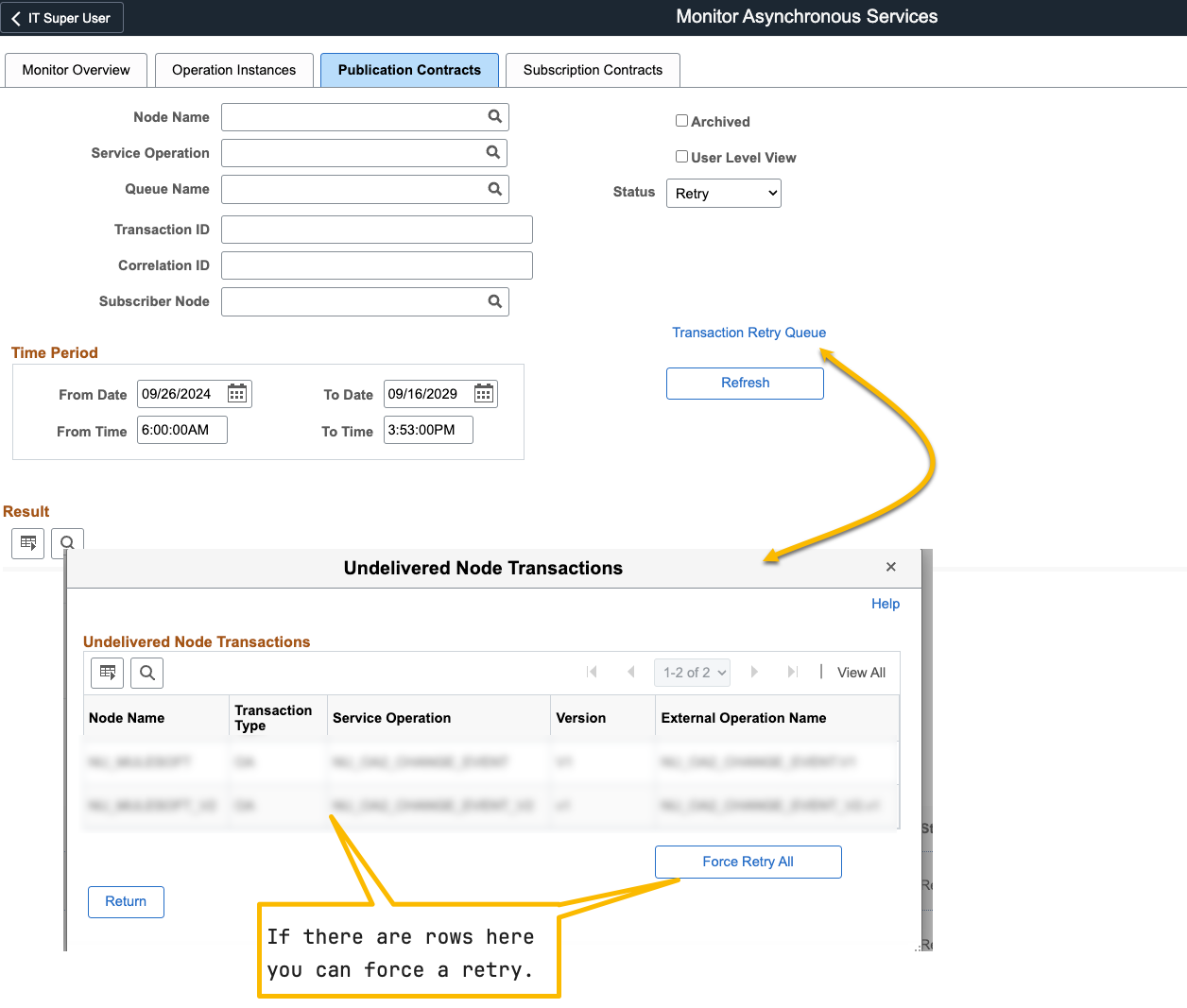
- Navigate to PeopleTools > Integration Broker > Service Operations Monitor > Monitoring > Asynchronous Services > Publication Contracts.
- Click the Transaction Retry Queue link.
- Select the node/operation and click Retry to force immediate redelivery:
- If the Transaction Retry Queue does not clear it (or if the target endpoint rejects
HTTP GETpings):- Delete the stuck entry from
PSNODESDOWN:DELETE FROM PSNODESDOWN WHERE MSGNODENAME = 'YOUR_EXTERNAL_NODE'; COMMIT; - Bounce the Integration Broker pub/sub application server domain processes (
PSPUBDSP). - Also verify that the queue in
PSQUEUEDEFNis set to Run (QUEUESTATUS = 1) rather than Pause (QUEUESTATUS = 2) under PeopleTools > Integration Broker > Service Operations Monitor > Administration > Queue Status.
- Delete the stuck entry from
See Also
psLens Operations & Intelligence
Look up any record, field, page, or component, audit security, and monitor Integration Broker across every database — in seconds.
- 30+ object types browsable
- 16 real-time alert types
- Read-only by design
- No App Designer or SQL required
psLens Operations & Intelligence
A web console built for the PeopleSoft community — operational monitoring, security auditing, and metadata browsing in one tool.
- Sub-second object search
- Catch stuck IB messages before users do
- Audit service permissions from one screen
- Works in any browser
psLens Operations & Intelligence
On-demand security and operational reports for your PeopleSoft environment — no client install required.
- 14 on-demand reports
- Markdown export for AI/LLM workflows
- No shared tenancy
- Built on 25+ years of PeopleSoft expertise
psLens Operations & Intelligence
Research any PeopleSoft object and monitor system health from a single browser tab — no App Designer, no SQL.
- 30+ PeopleSoft object types browsable
- Real-time alerts before users report problems
- Read-only and secure
- Private alpha — early access now
Chris Malek
Chris Malek is a PeopleTools® Technical Consultant with over two decades of experience. He is available for consulting engagements.
Work with ChrisSubscribe to Updates
PeopleSoft Simple Web Services
SWS turns SQL into production REST APIs — ready for AI, modern apps, and partner integrations. One install, unlimited potential.
- Configuration-driven, no coding required
- JSON, XML, and CSV output
- Works across all PeopleSoft pillars
- Built on 25+ years of PeopleSoft expertise
PeopleSoft Simple Web Services
A powerful PeopleSoft bolt-on that makes REST web services easy. You bring the SQL, SWS handles the rest.
- Go from idea to production in minutes
- Zero code migrations after install
- JSON, XML, and CSV output supported
- No PeopleCode or Integration Broker expertise required
PeopleSoft Simple Web Services
Traditional PeopleSoft web services cost $3,600–$13,000 each to develop. SWS deploys production REST APIs in under 5 minutes through configuration alone.
- No PeopleCode or Integration Broker expertise required
- Works across Campus Solutions, HCM, and Financials
- Built-in pagination, caching, and nested data structures
- Trusted by institutions across higher education and government
PeopleSoft Simple Web Services
Turn PeopleSoft data into clean REST APIs for AI integrations, modern applications, and vendor data feeds. Configuration-driven — no PeopleCode required.
- Deploy production APIs in under 5 minutes
- AI and LLM ready (RAG, chatbots, intelligent search)
- JSON, XML, and CSV output
- Zero modifications to delivered PeopleSoft objects