Contents
Contents
Synchronous HTTP Post to PeopleSoft Integration Broker
Introduction
This section will show a simple example of using the HttpListeningHandler to post to PeopleSoft using a synchronous service operation. This is the request/reply paradigm where code is run in response to in inbound message.
In this article:
- We are posting to an Synchronous Service operation in PeopleSoft
- The PeopleCode that is executed will examine the XML sent and do something different depending on the content. The response will also be different based on the input.
Pre-Reqs
The PeopleTools Setup
First let’s setup the PeopleSoft side.
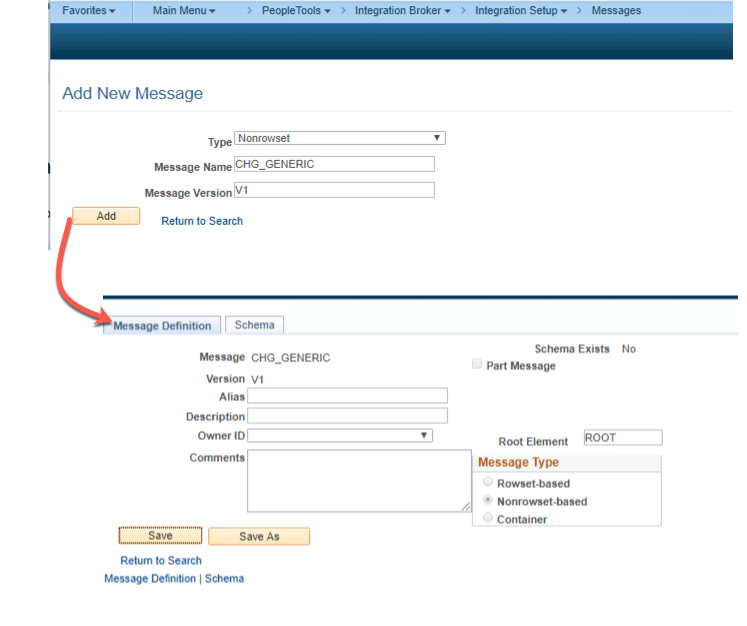
Create a New PeopleSoft Message Object
Now we need a PeopleSoft message object that will represent the XML that the client program will post.
| Message Attribute | Value |
|---|---|
| Name | CHG_GENERIC |
| Version | V1 |
| Type | Nonrowset-based |
Create a new Service
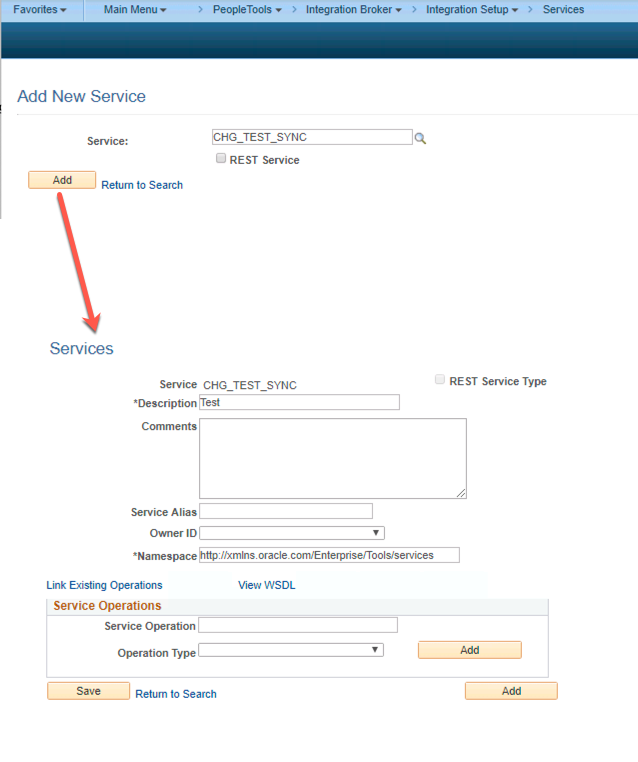
In this example, we create a new service. You can easily re-use another service if you wish.
| Service Attribute | Value |
|---|---|
| Name | CHG_TEST_SYNC |
Create the Handler PeopleCode
Now we need to create some PeopleCode that will run when a new message is posted to the integration broker for this Service Operation.
- Create an Application Package and Class with the following Package Class Name:
CHG_SYNC_TEST:syncTest - Paste in the following code into the Class:
import PS_PT:Integration:IRequestHandler;

class syncTest implements PS_PT:Integration:IRequestHandler
   method onRequest(&MSG As Message) Returns Message;
end-class;

method onRequest
   /+ &MSG as Message +/
   /+ Returns Message +/
   /+ Extends/implements PS_PT:Integration:IRequestHandler.OnRequest +/


   Local XmlDoc &xmlDocFromPython;

   Local XmlNode &requestRootNode;
   &xmlDocFromPython = &MSG.GetXmlDoc();

   &requestRootNode = &xmlDocFromPython.DocumentElement;


   /* Setup response xml body */

   Local Message &response;
   &response = CreateMessage(Operation.CHG_SYNC_TEST, %IntBroker_Response);
   Local XmlDoc &xmlout;

   Local XmlNode &childNode;
   &xmlout = CreateXmlDoc("<?xml version='1.0'?><response/>");


   Evaluate Lower(&requestRootNode.NodeName)
   When = "helloworld"
      &childNode = &xmlout.DocumentElement.AddElement("helloworld").AddText("Hello client");
      Break;

   When = "activeusercount"

      Local integer &ucount;
      SQLExec("SELECT COUNT(*) FROM PSOPRDEFN WHERE ACCTLOCK = 0 ", &ucount);

      &childNode = &xmlout.DocumentElement.AddElement("activeusercount").AddText(String(&ucount));
      Break;

   When-Other
      &childNode = &xmlout.DocumentElement.AddElement("error").AddText("I do not understand. Please try again. You submitted: " | &requestRootNode.NodeName);
      Break;
   End-Evaluate;


   &response.SetXmlDoc(&xmlout);

   Return &response;

end-method;- A synchronous request must implement the
OnRequestmethod. - You will see that the code examines the Root Node of the XML and will run a different branch of code depending on the input.
- “helloworld” - If the root node is “helloworld” we will just echo back a “Hello client” message.
- “activeusercount” - If the root node is “activeusercount”, then we will do a count of all unlocked users in the system and return that in a response
- If any other root node is passed in we return an error message that the input was not understood and we echo back the root node name in the message.
This will probably make a little more sense later in the article when we look at the request and response from the Python client.
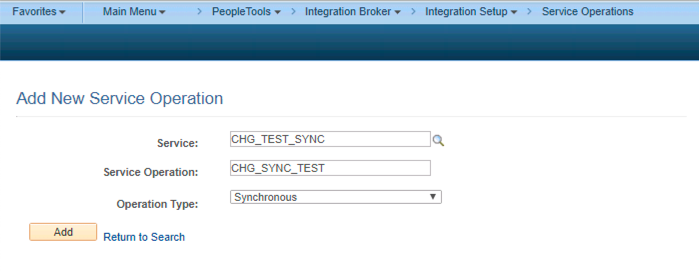
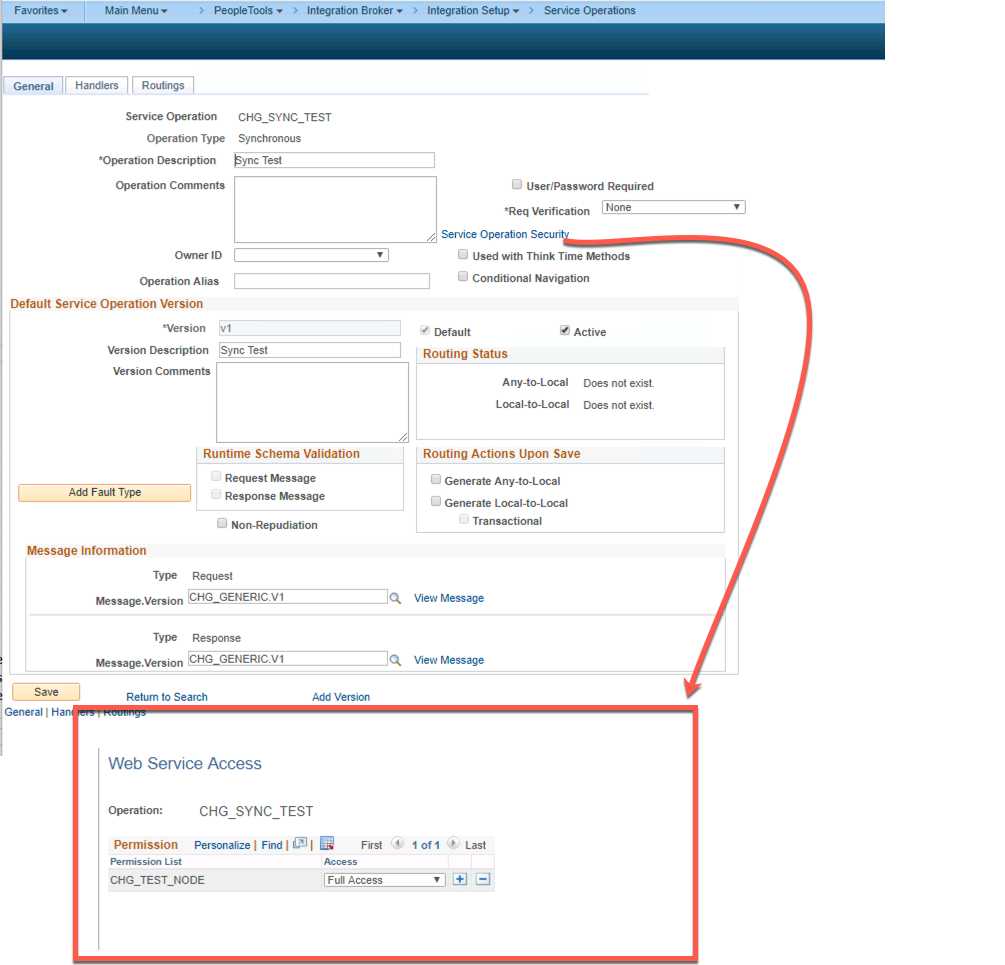
Setup new Synchronous Service Operation
Now we need to set up the actual Service Operation. There are several steps here.
| Service Operation Attribute | Value |
|---|---|
| Name | CHG_SYNC_TEST |
| Type | Synchronous |
| Version | V1 |
| Active | Checked |
| Message Version | CHG_TEST.V1 |
| Queue Name | IB_EXAMPLES (or create a new queue ) |
- Click on the “Service Operation Security” link
- Input a permission list that you have on your user profile.
- Additionally, assign permission lists grants to a permission list that is on your “default user id” from your node definition.
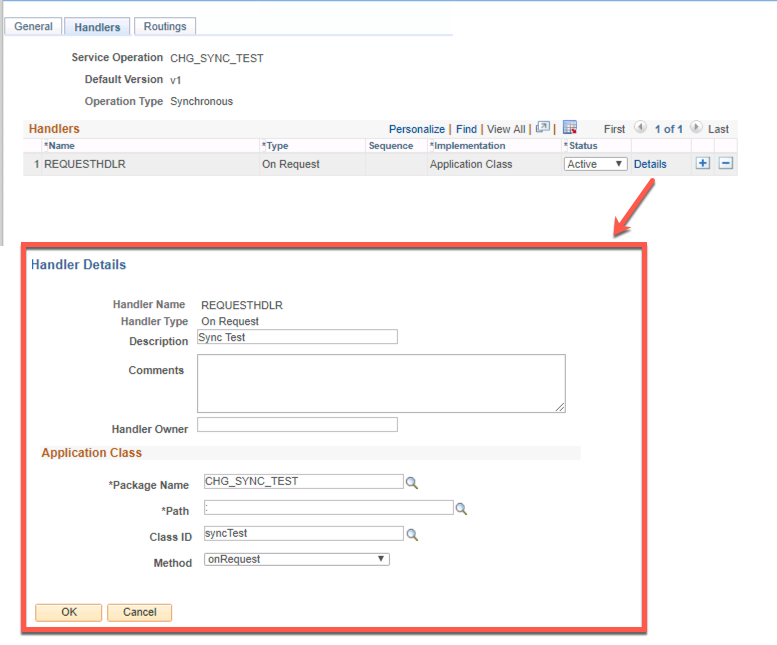
Now we need to hook the CHG_I_TESTER:syncTester application class to execute when a service operation is posted. We do this on the Handler tab of the Service Operation.
| Service Operation Handler Attribute | Value |
|---|---|
| Handler Name | Test (This value will be over written by peoplecode) |
| Handler Type | OnRequest |
| Implementation | Application Class |
| Description | Tester |
| Package Name | CHG_I_TESTER |
| Path | : |
| Class ID | syncTest |
| Method | OnRequest |
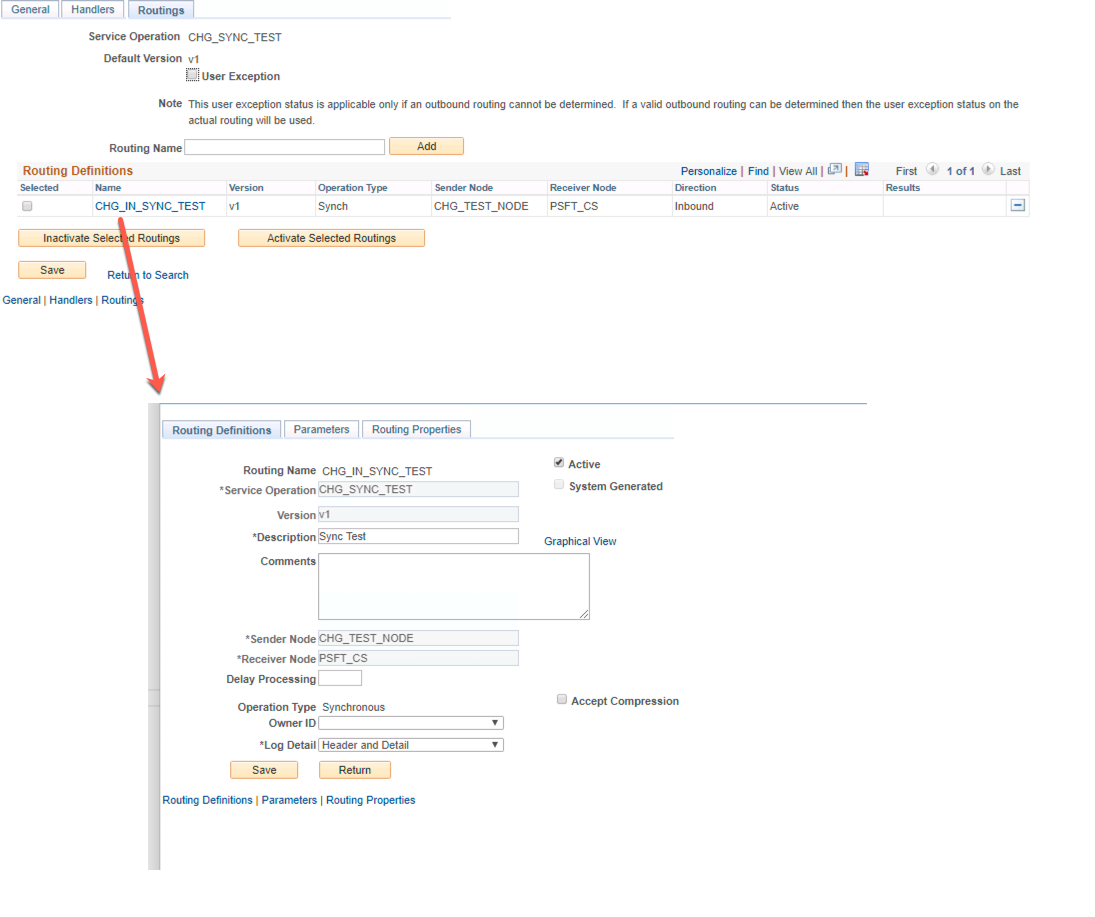
Now we need to setup the routing to make this node able to send Service Operations.
| Service Operation Routing Attribute | Value |
|---|---|
| routing name | CHG_IN_SYNC_TEST |
| sender node | CHG_TEST_NODE |
| Receiver Node | PSFT_CS (or whatever your default local node is ) |
| External Alias | CHG_SYNC_TEST.V1 |
| Active | Checked |
Invoking The Web Service
Now our PeopleTools system should be ready to receive messages from some HTTP client.
We are going to document the web service call in HTTP syntax as it is language agnostic.
POST https://ib.cedarhilllsgroup.com/PSIGW/HttpListeningConnector HTTP/1.1
OperationName: CHG_SYNC_TEST.v1
Content-Type: text/xml
From: CHG_TEST_NODE
To: PSFT_CS
Password: vase-lawless-realty
Accept: */*
accept-encoding: gzip, deflate
content-length: 35

<?xml version="1.0"?> <helloworld/>
Response:
HTTP/1.1 200 OK
status: 200
Date: Tue, 26 Feb 2019 18:54:12 GMT
Content-Length: 81
Content-Type: text/xml; charset=UTF-8
TransactionID: e837d6b8-39f7-11e9-bcb4-fb3330b2eab1

<?xml version="1.0"?> <response><helloworld>Hello client</helloworld></response>
The handler can also run a different branch if the payload XML has a <activeusercount/> root node. Here is that example
POST https://ib.cedarhilllsgroup.com/PSIGW/HttpListeningConnector HTTP/1.1
OperationName: CHG_SYNC_TEST.v1
Content-Type: text/xml
From: CHG_TEST_NODE
To: PSFT_CS
Password: vase-lawless-realty
Accept: */*
accept-encoding: gzip, deflate
content-length: 40

<?xml version="1.0"?> <activeusercount/>
Response:
HTTP/1.1 200 OK
status: 200
Date: Tue, 26 Feb 2019 18:57:17 GMT
Content-Length: 80
Content-Type: text/xml; charset=UTF-8
TransactionID: 5686417f-39f8-11e9-bcb4-fb3330b2eab1

<?xml version="1.0"?> <response><activeusercount>6</activeusercount></response>
Summary
So what did we learn? We learned that you can pretty much submit any XML to a synchronous Service Operation and have it respond to what was submitted. Of course, the functionality presented here is completely useless. You can extrapolate the example here to do whatever. The Python client could be sending in actual data in the XML. The PeopleCode could actually parse the data and update something in PeopleSoft and return a response. It is up to the two systems to agree upon an XML format to exchange.
psLens Operations & Intelligence
Look up any record, field, page, or component, audit security, and monitor Integration Broker across every database — in seconds.
- 30+ object types browsable
- 16 real-time alert types
- Read-only by design
- No App Designer or SQL required
psLens Operations & Intelligence
A web console built for the PeopleSoft community — operational monitoring, security auditing, and metadata browsing in one tool.
- Sub-second object search
- Catch stuck IB messages before users do
- Audit service permissions from one screen
- Works in any browser
psLens Operations & Intelligence
On-demand security and operational reports for your PeopleSoft environment — no client install required.
- 14 on-demand reports
- Markdown export for AI/LLM workflows
- No shared tenancy
- Built on 25+ years of PeopleSoft expertise
psLens Operations & Intelligence
Research any PeopleSoft object and monitor system health from a single browser tab — no App Designer, no SQL.
- 30+ PeopleSoft object types browsable
- Real-time alerts before users report problems
- Read-only and secure
- Private alpha — early access now
Chris Malek
Chris Malek is a PeopleTools® Technical Consultant with over two decades of experience. He is available for consulting engagements.
Work with ChrisSubscribe to Updates
PeopleSoft Simple Web Services
SWS turns SQL into production REST APIs — ready for AI, modern apps, and partner integrations. One install, unlimited potential.
- Configuration-driven, no coding required
- JSON, XML, and CSV output
- Works across all PeopleSoft pillars
- Built on 25+ years of PeopleSoft expertise
PeopleSoft Simple Web Services
A powerful PeopleSoft bolt-on that makes REST web services easy. You bring the SQL, SWS handles the rest.
- Go from idea to production in minutes
- Zero code migrations after install
- JSON, XML, and CSV output supported
- No PeopleCode or Integration Broker expertise required
PeopleSoft Simple Web Services
Traditional PeopleSoft web services cost $3,600–$13,000 each to develop. SWS deploys production REST APIs in under 5 minutes through configuration alone.
- No PeopleCode or Integration Broker expertise required
- Works across Campus Solutions, HCM, and Financials
- Built-in pagination, caching, and nested data structures
- Trusted by institutions across higher education and government
PeopleSoft Simple Web Services
Turn PeopleSoft data into clean REST APIs for AI integrations, modern applications, and vendor data feeds. Configuration-driven — no PeopleCode required.
- Deploy production APIs in under 5 minutes
- AI and LLM ready (RAG, chatbots, intelligent search)
- JSON, XML, and CSV output
- Zero modifications to delivered PeopleSoft objects