Contents
Contents
The CI Development Process
Building or adopting a Component Interface is an exercise in reverse-engineering how a component behaves online before writing a single line of PeopleCode. Skipping the online analysis phase is the single most common cause of failed CI projects.
End-to-End Development Workflow
Key 5–10 transactions manually in PIA"] --> S2["2. Inspect Component Structure
Examine Search Record, Scrolls, and PeopleCode"] S2 --> S3["3. Check Delivered CIs
Find Object References on Component"] S3 --> S4{"Suitable Delivered
CI Exists?"} S4 -->|"Yes"| S5["Use Delivered CI
(Watch out for *SYNC CIs!)"] S4 -->|"No"| S6["4. Create & Clean Up New CI
Expose required fields, prune clutter, fix _1 names"] S5 --> S7["5. Grant Permission List Security
Edit -> Full Access -> OK -> Save"] S6 --> S7 S7 --> S8["6. Validate in CI Tester
Test Get, Create, Collections & Save interactively"] S8 --> S9["7. Generate PeopleCode Template
Drag CI into editor for property names & errorHandler"] S9 --> S10["8. Write Production Code
Implement in IB Handler or App Engine with Staging Table"]
Step 1: Become a Data Entry Expert on the Target Component
Before opening Application Designer, log into PIA and manually key 5 to 10 representative transactions into the target component (both Add a New Value and Update/Display):
- Watch the exact tab and field entry sequence: Which fields must be populated first before other fields become editable or populate defaults?
- Identify hidden defaults and derived work fields: Does the page require a confirmation field (such as a password confirmation field on a derived/work record) or a “Go” / “Calculate” push button to be clicked before saving?
- Note prompt table dependencies: If setting
SETIDorBUSINESS_UNITcontrols valid values on a downstream field, your CI code will need to set those properties in the exact same order. - Test edge cases online: Try entering invalid values or duplicate rows online so you recognize the exact error messages the component produces.
Step 2: Inspect the Component in Application Designer
Open the target Component in Application Designer and inspect its internal structure:
- Check Component Properties > Use to see the Search Record, Add Search Record, and allowed actions (
Add,Update/Display,Update/Display All,Correction). - Review the Page definitions and the Order tab to see the scroll levels (Level 0, Level 1, Level 2, Level 3) and which records sit at each level.
- Scan the Component, Page, and Record PeopleCode for
ComponentChanged(),DoSaveNow(),WinMessage(),Transfer(), or%CompIntfcNamebranches.
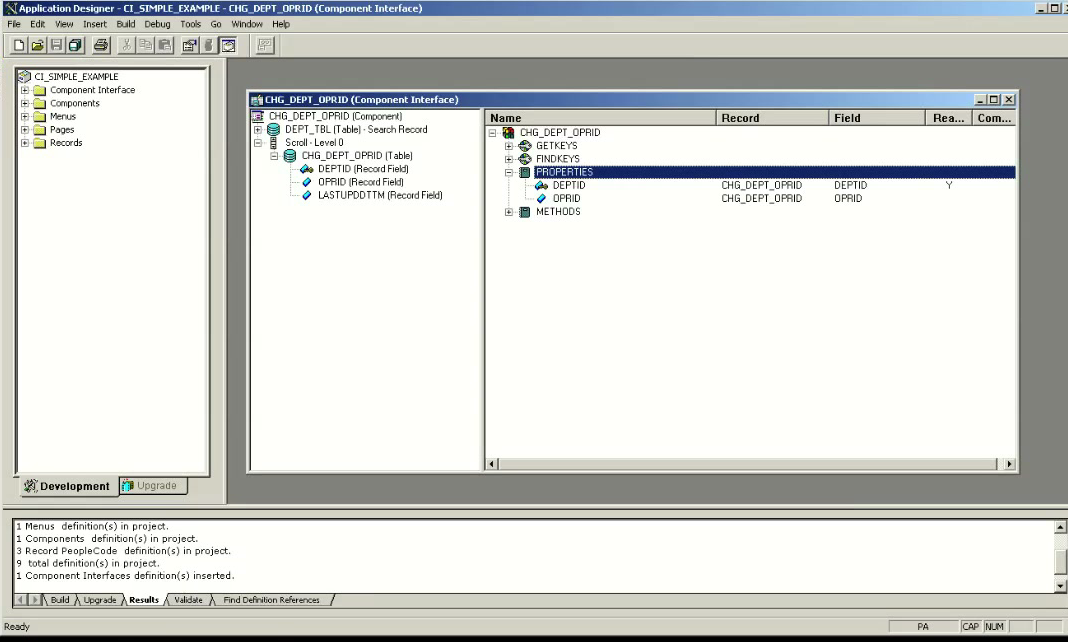
Step 3: Check for an Existing Delivered CI
Never build a custom Component Interface without first checking whether Oracle already delivers one for the component. Right-click the Component definition in Application Designer and select Find Object References.
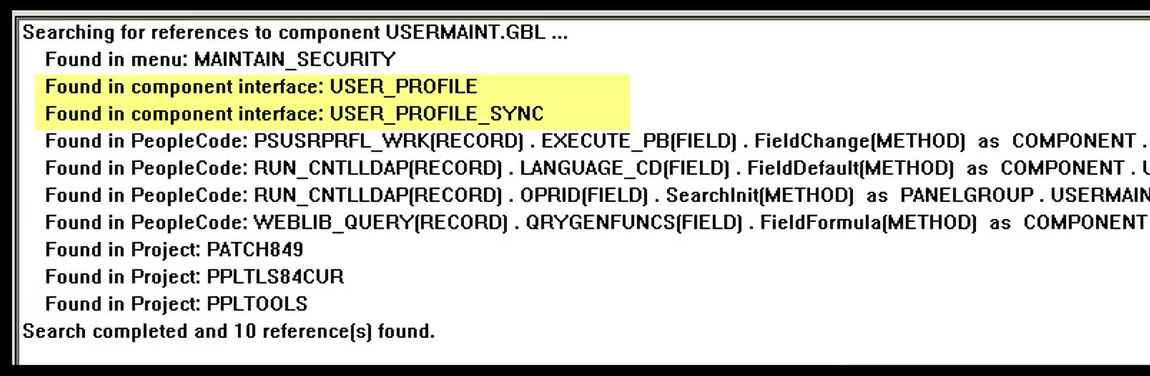
For example, running Find Object References on the USERMAINT component returns two delivered Component Interfaces: USER_PROFILE and USER_PROFILE_SYNC.
*SYNC Component Interfaces: Many components have multiple delivered CIs, including *SYNC variants (such as USER_PROFILE_SYNC on USERMAINT) built specifically for Integration Broker EIP message synchronization. If you open USER_PROFILE_SYNC, you will find it exposes only two read-only properties (OPRID and OPRDEFNDESC) and none of the collections or methods needed to create or maintain a user. Always inspect the exposed properties, collections, and custom methods of every delivered candidate before choosing one.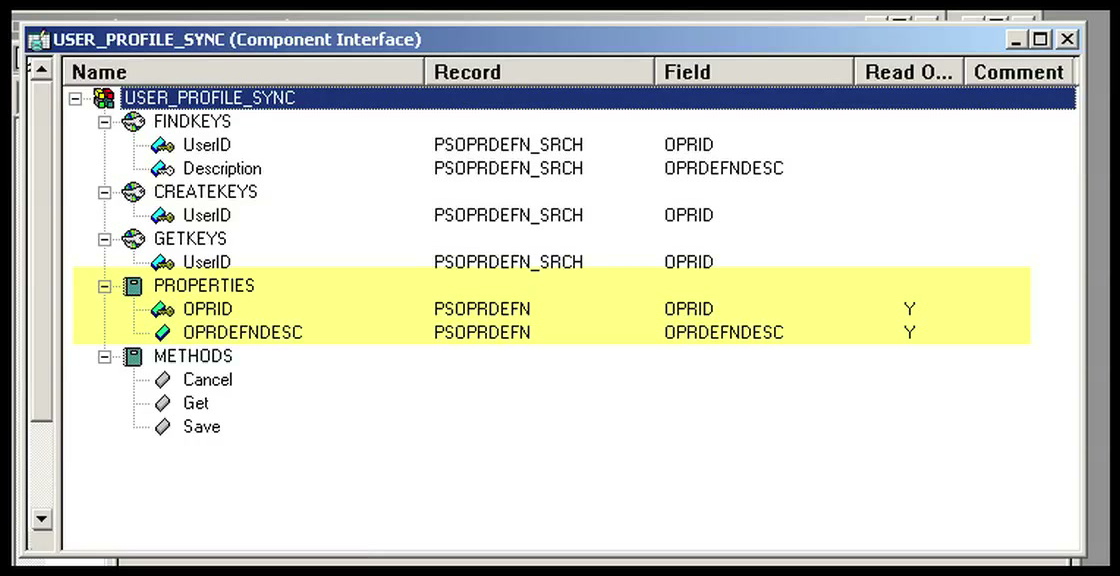
By contrast, inspecting the delivered USER_PROFILE Component Interface reveals all the Level 0 properties, the EmailAddresses, IDTypes, and Roles collections, and four custom PeopleCode methods (ResetPassword, ResetPassword_AlphaNum, SetPassword, SetUserDescription):
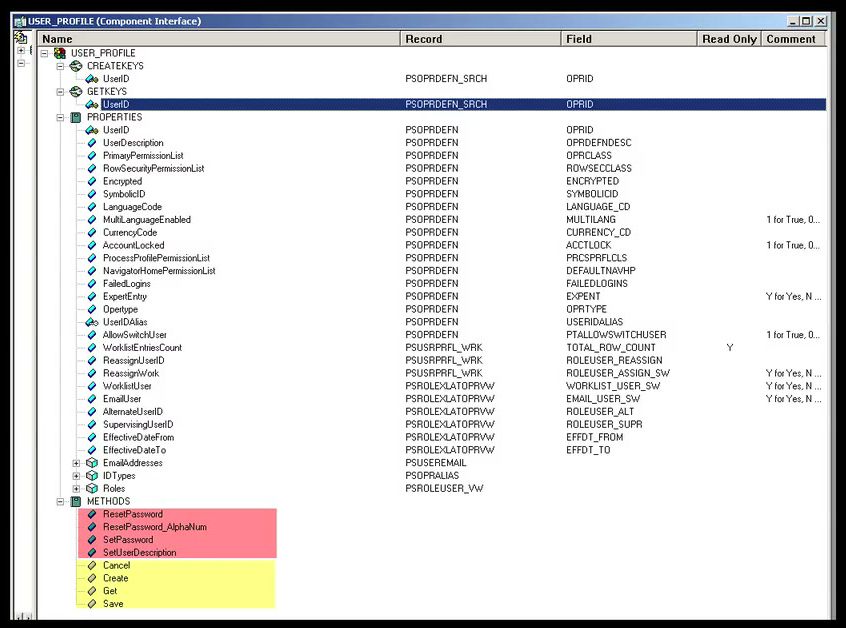
Step 4: Create and Clean Up a New CI Definition
If no delivered CI fits your requirements, create a new Component Interface in Application Designer (File > New > Component Interface), select the target Component, and click Yes when prompted to default the properties from the underlying component.
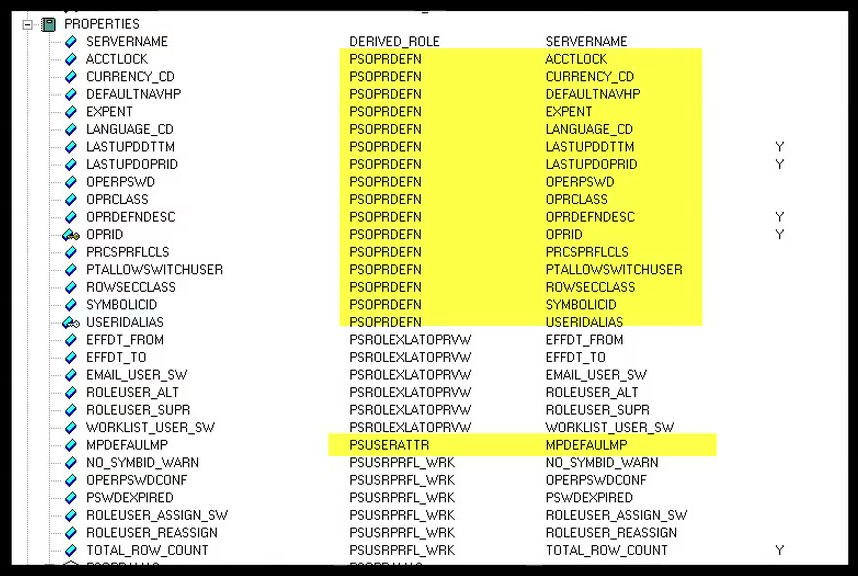
Auto-defaulting exposes every field on every page of the component, which creates a bloated and brittle interface. Immediately clean up the new CI definition using these five rules:
- Keep derived/work fields that Online PeopleCode expects: Before deleting properties from
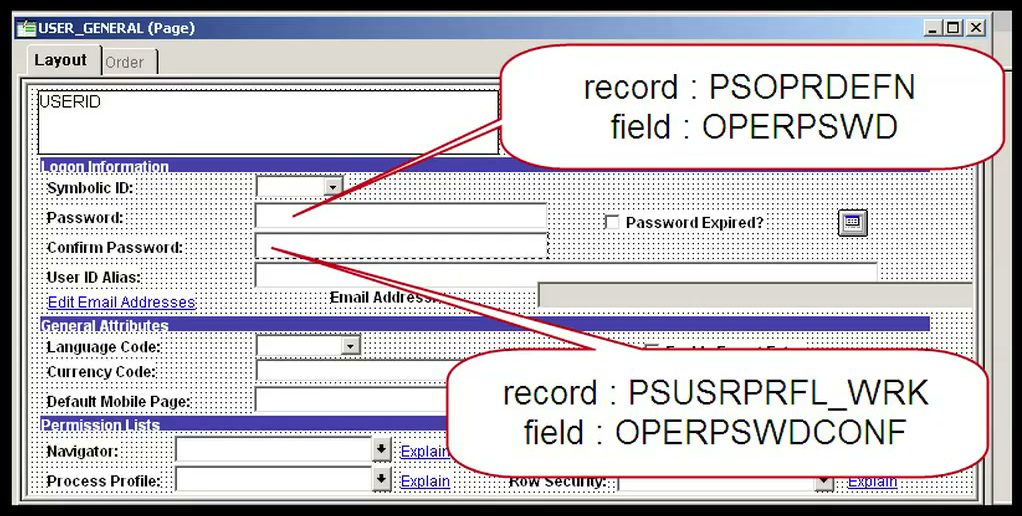
DERIVEDor*_WRKrecords, check whetherFieldEditorSaveEditPeopleCode validates them. OnUSERMAINT(USER_GENERALpage), typing a password intoPSOPRDEFN.OPERPSWDfiresFieldEditPeopleCode that compares it against the confirm-password work fieldPSUSRPRFL_WRK.OPERPSWDCONF. If you deleteOPERPSWDCONFfrom your CI, you will never be able to set a user’s password through properties.
- Delete unneeded properties and hidden work grids: Compare the newly defaulted collections against what you actually use online. For example, defaulting a CI on
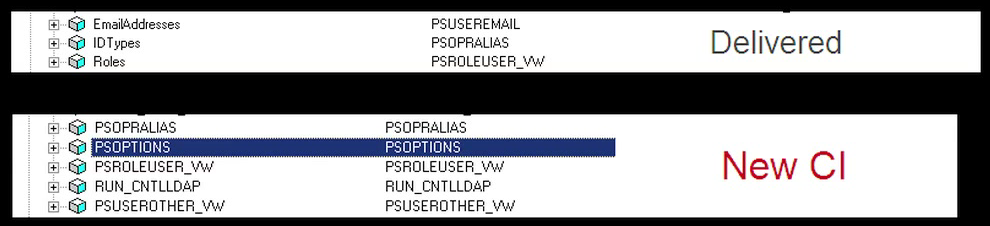
USERMAINTexposes five collections (PSOPRALIAS,PSOPTIONS,PSROLEUSER_VW,RUN_CNTLLDAP,PSUSEROTHER_VW), includingRUN_CNTLLDAP, which comes from a hidden grid at the bottom of a page that is never used during normal user maintenance. Delete unused collections and properties so your API surface stays small and readable.
- Manually drag over required
Longfields: Application Designer does not automatically expose Long Character (Long/LONG VARCHAR) fields when defaulting a CI. If your integration needs to populate a comments or long description field, drag it manually from the component tree (left pane) into the CI properties (right pane). - Rename duplicate
_1property names: Because CI property names must be unique within a scroll level, Application Designer automatically appends_1,_2, etc. whenever the same field name appears on multiple records at the same level (for example,DERIVED.EMPLIDbecomesEMPLIDandPERSON.EMPLIDbecomesEMPLID_1, orPSROLEUSER_VW.ROLENAMEbecomesROLENAME_1because a work field on the same scroll already claimedROLENAME). Always rename cryptic_1properties to clear, self-documenting names, and consider renaming collections to friendly business names (just asUSER_PROFILErenamesPSUSEREMAILtoEmailAddressesandPSROLEUSER_VWtoRoles).

- Disable unused Standard Methods: Open File > Definition Properties > Standard Methods and uncheck
Find(orCreate) if callers should only ever retrieve or update known keys. Reducing allowed methods tightens security and prevents accidental wildcard searches.
Step 5: Grant Permission List Security
Every Component Interface—even when called from an Application Engine batch program or Integration Broker handler—checks whether the current runtime user (%OperatorId) has Permission List authorization for the specific CI method being invoked (Get, Create, Save, Cancel, Find, and any custom methods).
(PSAUTHBUSCOMP)"] User --> AE["Application Engine / IB Handler"] User --> PIA["Online Page PeopleCode"] AE --> CI["Component Interface"] PIA --> CI PL -.->|"Authorizes Get / Create / Save"| CI
To grant access, navigate to PeopleTools > Security > Permissions & Roles > Permission Lists, open the appropriate Permission List, go to the Component Interfaces tab, add the CI name, click Edit, click Full Access (All), click OK, and click Save.
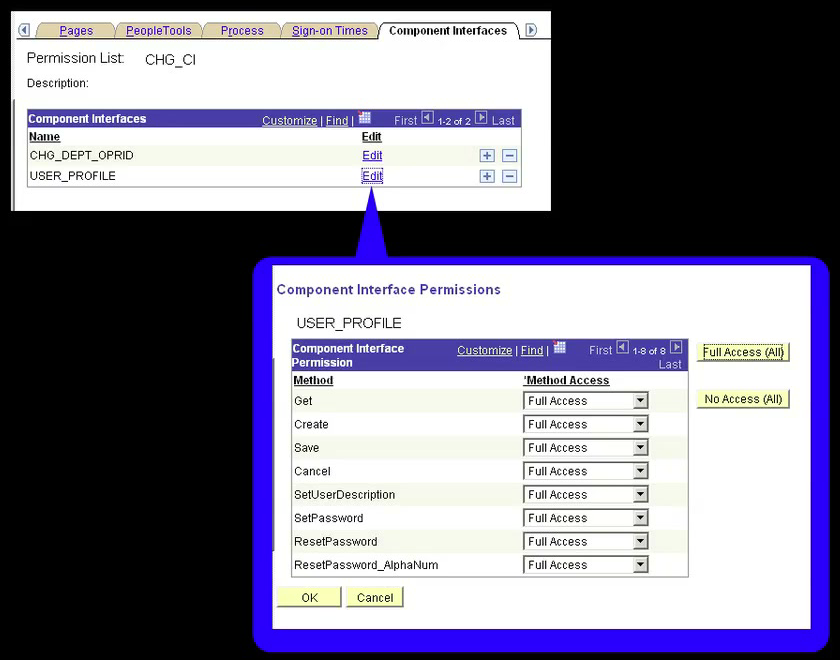
PSAUTHBUSCOMP): Adding a Component Interface row to the Component Interfaces tab on a Permission List and clicking Save does nothing by itself! You must click the Edit link on that row, set the individual method permissions (Get, Create, Save, Cancel, Find, and custom methods) to Full Access, click OK, and then save the Permission List. Until you click Edit and grant method-level access, no rows are written to PSAUTHBUSCOMP (or AUTHORIZEDACTIONS remains 0), and runtime calls will fail with Not Authorized (90,6).psLens Operations & Intelligence
Look up any record, field, page, or component, audit security, and monitor Integration Broker across every database — in seconds.
- 30+ object types browsable
- 16 real-time alert types
- Read-only by design
- No App Designer or SQL required
psLens Operations & Intelligence
A web console built for the PeopleSoft community — operational monitoring, security auditing, and metadata browsing in one tool.
- Sub-second object search
- Catch stuck IB messages before users do
- Audit service permissions from one screen
- Works in any browser
psLens Operations & Intelligence
On-demand security and operational reports for your PeopleSoft environment — no client install required.
- 14 on-demand reports
- Markdown export for AI/LLM workflows
- No shared tenancy
- Built on 25+ years of PeopleSoft expertise
psLens Operations & Intelligence
Research any PeopleSoft object and monitor system health from a single browser tab — no App Designer, no SQL.
- 30+ PeopleSoft object types browsable
- Real-time alerts before users report problems
- Read-only and secure
- Private alpha — early access now
Chris Malek
Chris Malek is a PeopleTools® Technical Consultant with over two decades of experience. He is available for consulting engagements.
Work with ChrisSubscribe to Updates
PeopleSoft Simple Web Services
SWS turns SQL into production REST APIs — ready for AI, modern apps, and partner integrations. One install, unlimited potential.
- Configuration-driven, no coding required
- JSON, XML, and CSV output
- Works across all PeopleSoft pillars
- Built on 25+ years of PeopleSoft expertise
PeopleSoft Simple Web Services
A powerful PeopleSoft bolt-on that makes REST web services easy. You bring the SQL, SWS handles the rest.
- Go from idea to production in minutes
- Zero code migrations after install
- JSON, XML, and CSV output supported
- No PeopleCode or Integration Broker expertise required
PeopleSoft Simple Web Services
Traditional PeopleSoft web services cost $3,600–$13,000 each to develop. SWS deploys production REST APIs in under 5 minutes through configuration alone.
- No PeopleCode or Integration Broker expertise required
- Works across Campus Solutions, HCM, and Financials
- Built-in pagination, caching, and nested data structures
- Trusted by institutions across higher education and government
PeopleSoft Simple Web Services
Turn PeopleSoft data into clean REST APIs for AI integrations, modern applications, and vendor data feeds. Configuration-driven — no PeopleCode required.
- Deploy production APIs in under 5 minutes
- AI and LLM ready (RAG, chatbots, intelligent search)
- JSON, XML, and CSV output
- Zero modifications to delivered PeopleSoft objects