Contents
Contents
Delay Processing in Inbound Asynchronous Subscription Handlers
When setting up routings for subscription handlers, you can define a “delay” of when the subscription handler will process. There are various reasons why you would want to do this. Here we will show the result of the delay and what to expect in the integration broker. This is not well documented in PeopleBooks.
In the following example, we are pushing PERSON_BASIC_SYNC from a Campus Solutions PeopleSoft database to an HCM instance. We desire the HCM system to wait for a few minutes before processing the inbound message.
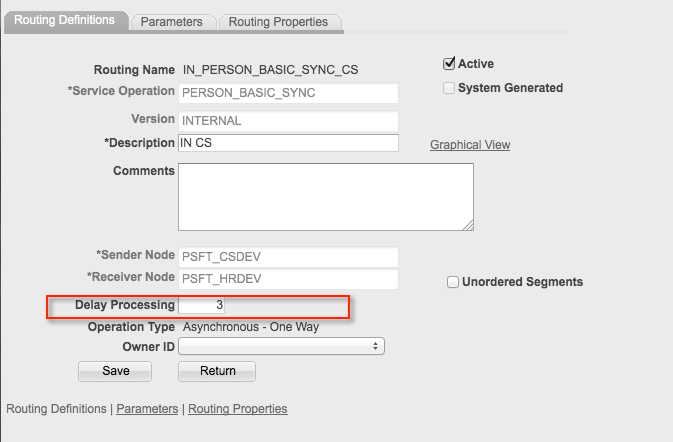
In the HCM PERSON_BASIC_SYNC service Operation Routing page, we set up a delay. This only seems to be available for inbound messages.
First, we set up the inbound routing and set the “Delay Processing” to 3 which represents 3 minutes based on testing (again no PeopleBooks documentation).
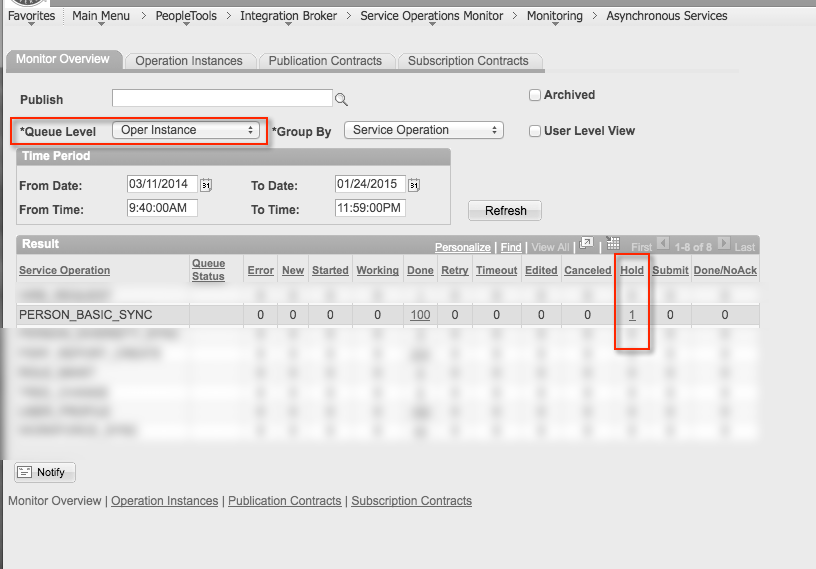
So what happens to the message when you set up a delay? It turns out that the “Operation Instance” gets put into a status of “hold” during the duration of the delay period as seen in this screenshot.
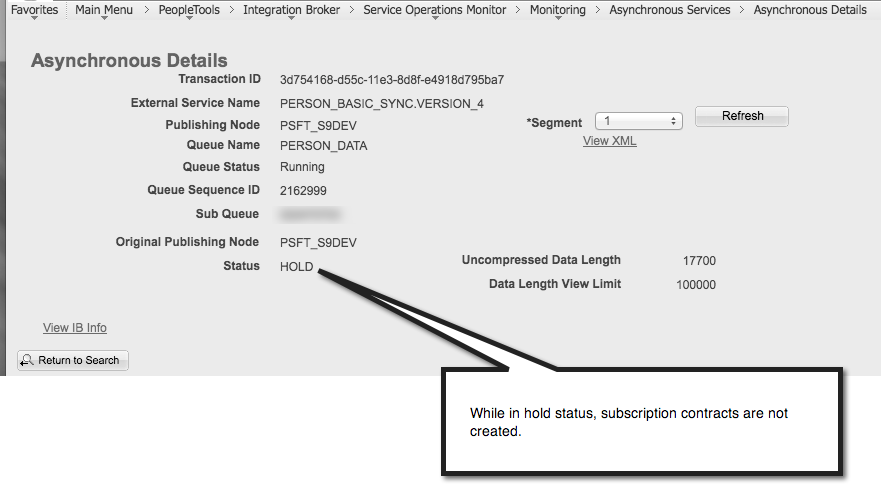
If we drill into the detail of the service operation, we will see that the subscription contracts are not created during the delay period.
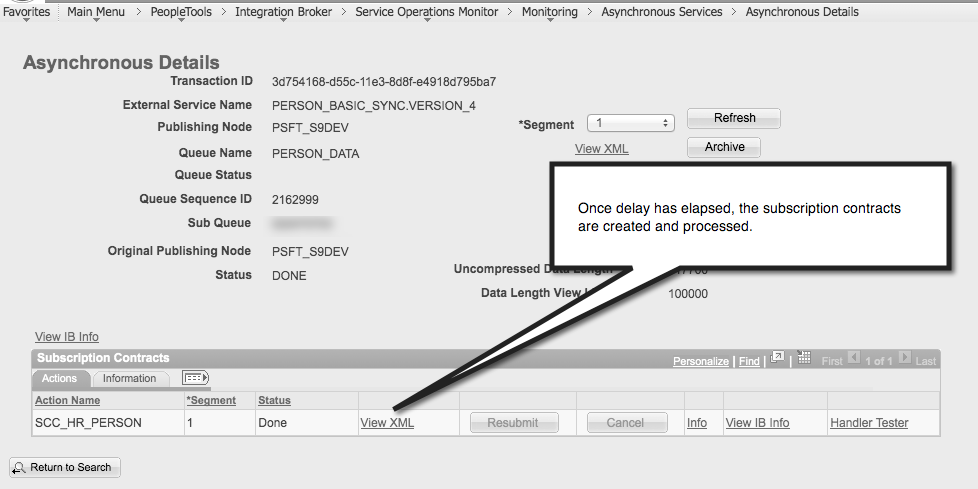
Once the delay period has elapsed, the subscription contracts are then created for processing by the appropriate application server processes.
psLens Operations & Intelligence
Look up any record, field, page, or component, audit security, and monitor Integration Broker across every database — in seconds.
- 30+ object types browsable
- 16 real-time alert types
- Read-only by design
- No App Designer or SQL required
psLens Operations & Intelligence
A web console built for the PeopleSoft community — operational monitoring, security auditing, and metadata browsing in one tool.
- Sub-second object search
- Catch stuck IB messages before users do
- Audit service permissions from one screen
- Works in any browser
psLens Operations & Intelligence
On-demand security and operational reports for your PeopleSoft environment — no client install required.
- 14 on-demand reports
- Markdown export for AI/LLM workflows
- No shared tenancy
- Built on 25+ years of PeopleSoft expertise
psLens Operations & Intelligence
Research any PeopleSoft object and monitor system health from a single browser tab — no App Designer, no SQL.
- 30+ PeopleSoft object types browsable
- Real-time alerts before users report problems
- Read-only and secure
- Private alpha — early access now
Chris Malek
Chris Malek is a PeopleTools® Technical Consultant with over two decades of experience. He is available for consulting engagements.
Work with ChrisSubscribe to Updates
PeopleSoft Simple Web Services
SWS turns SQL into production REST APIs — ready for AI, modern apps, and partner integrations. One install, unlimited potential.
- Configuration-driven, no coding required
- JSON, XML, and CSV output
- Works across all PeopleSoft pillars
- Built on 25+ years of PeopleSoft expertise
PeopleSoft Simple Web Services
A powerful PeopleSoft bolt-on that makes REST web services easy. You bring the SQL, SWS handles the rest.
- Go from idea to production in minutes
- Zero code migrations after install
- JSON, XML, and CSV output supported
- No PeopleCode or Integration Broker expertise required
PeopleSoft Simple Web Services
Traditional PeopleSoft web services cost $3,600–$13,000 each to develop. SWS deploys production REST APIs in under 5 minutes through configuration alone.
- No PeopleCode or Integration Broker expertise required
- Works across Campus Solutions, HCM, and Financials
- Built-in pagination, caching, and nested data structures
- Trusted by institutions across higher education and government
PeopleSoft Simple Web Services
Turn PeopleSoft data into clean REST APIs for AI integrations, modern applications, and vendor data feeds. Configuration-driven — no PeopleCode required.
- Deploy production APIs in under 5 minutes
- AI and LLM ready (RAG, chatbots, intelligent search)
- JSON, XML, and CSV output
- Zero modifications to delivered PeopleSoft objects