Contents
Contents
Limitations and Gotchas
Even though a Component Interface runs the underlying Component’s business logic, a Component Interface is not the browser UI. Understanding where the CI runtime differs from an interactive PIA session will save you days of debugging silent failures and mysterious crashes.
What Does Not Run (or Runs Differently) in a CI
When a Component is invoked through a Component Interface rather than a browser:
| Feature / Event | Behavior Under a Component Interface |
|---|---|
SearchInit & SearchSave PeopleCode |
Do NOT fire. When you populate GetKeys or CreateKeys on a CI and call .Get() or .Create(), the CI runtime bypasses interactive search page events. If SearchInit initializes a Global or Component variable that downstream RowInit or SaveEdit PeopleCode relies on, your CI will fail unless that initialization is also guarded in PostBuild or RowInit. |
PageActivate PeopleCode |
Does NOT automatically fire across pages because a CI user does not “tab” between visual pages. Logic written exclusively in PageActivate is invisible to a Component Interface. |
Dynamic Visual Hiding (.Visible = False, .DisplayOnly = True) |
Ignored by the CI caller. A PeopleCode script can still read and write properties on a CI even if the underlying page field is hidden or grayed out dynamically for online users (unless FieldEdit/SaveEdit explicitly rejects the change). |
| Related Display Fields | Not exposed. Display-only related display fields on a page cannot be read as CI properties. |
| Prompt Table Validation | Always enforced. Setting a property to a value that does not exist in its record-field prompt table logs an Invalid value error to %Session.PSMessages. Furthermore, if the prompt table uses dynamic keys (%EditTable or higher-level buffer fields like SETID), you must populate those prerequisite properties first. |
Interactive GUI Functions (WinMessage, MessageBox with >1 button, DoModal, Transfer) |
Unsupported or fatal. Any PeopleCode that stops to wait for user clicks (DoModal, multi-button WinMessage/MessageBox) or transfers the browser to another page (Transfer, TransferPage) fails when executed inside a CI. Guard them with If All(%CompIntfcName) Then .... |
System Variables Under a Component Interface
When PeopleCode executes inside a Component Interface call, PeopleTools populates specific system variables differently from an online browser session:
| System Variable | Value Online (PIA) | Value Under a Component Interface |
|---|---|---|
%CompIntfcName |
"" (Empty string) |
Name of the active Component Interface (e.g., "USER_PROFILE") |
%Component |
Component name (e.g., "USERMAINT") |
Component name (e.g., "USERMAINT") |
%Menu |
Menu name (e.g., "MAINTAIN_SECURITY") |
"" (Empty string — CIs do not run through a Menu!) |
%Page |
Current active Page name | "" (Empty string, or first page in component) |
Always use If None(%CompIntfcName) Then to wrap UI-only PeopleCode (Transfer, DoModal, PageActivate-style formatting) so it does not break Component Interface callers:
If None(%CompIntfcName) Then
   /* Online browser user only */
   Transfer( False, MenuName.MAINTAIN_SECURITY, BarName.USE, ItemName.USERMAINT, Page.USER_GENERAL, %Action_UpdateDisplay);
End-If;
Row-Level Security and the Menu Search-Record Trap
In PIA, an administrator can override a Component’s default Search Record at the Menu level. However, a Component Interface wraps the Component definition directly and never passes through a PeopleSoft Menu.
(Search Record Override: SEC_VW)"] Menu --> Comp1["Component
(Base Search Record: EMPL_SRCH)"] end subgraph CIFlow["Component Interface Call"] Caller["CI Caller (%OperatorId)"] --> CIDef["Component Interface"] CIDef --> Comp2["Component
(Always Uses Base Search Record: EMPL_SRCH)"] end
- Row-level security is still enforced: The CI’s
Get()andFind()methods query the Component’s Search Record using the current runtime user (%OperatorId/%RowSecurityPermissionList). If the Search Record is a security view keyed byOPRIDorROWSECCLASS, the runtime user executing the Application Engine or IB handler must have row-level security access to the target rows, or.Get()will fail withNo rows exist for the specified keys (91,50). - Menu-level search record overrides are ignored: Because a CI bypasses the Menu layer, it always uses the Search Record configured on the Component itself.
InteractiveMode = True and Field Entry Order
By default, a Component Interface starts with InteractiveMode = False, which queues up all property assignments and runs field validations in batch when .Save() is called.
If the underlying component has FieldChange PeopleCode on Field A that populates or unlocks Field B (or sets %EditTable prompt table values for Field B):
- You must set
&ci.InteractiveMode = Truebefore setting properties. - You must assign properties in your PeopleCode in the exact same top-to-bottom tab order that a human user keys them on the page.
Pressing Push Buttons via Derived/Work Fields
Many complex PeopleSoft components place business logic behind an online push button (such as a “Calculate”, “Default Values”, or “Go” button bound to DERIVED.BUTTON_FLD FieldChange). How do you “click” a button in a Component Interface?
- Expose the derived/work record field bound to that push button as a Property on your Component Interface.
- Set
&ci.InteractiveMode = True. - Assign the trigger value (typically
"Y"or"X") to that property in PeopleCode (e.g.,&ci.BUTTON_FLD = "Y"), which immediately fires the button’sFieldChangePeopleCode!
The EditHistoryItems Silent Save Trap
When updating effective-dated scrolls (PS_JOB, PS_NAMES, etc.), Pay close attention to the combination of GetHistoryItems and EditHistoryItems:
GetHistoryItems |
EditHistoryItems |
Equivalent Online Mode | Behavior on Existing Rows |
|---|---|---|---|
False |
False |
Update/Display | Retrieves current and future rows only. Existing current/history rows are read-only; you must insert a new effective-dated row. |
True |
False |
Update/Display All | Retrieves all rows (including History), but historical rows are still read-only! |
True |
True |
Correction | Retrieves all rows and allows modifying existing rows in place. |
GetHistoryItems = True and leave EditHistoryItems = False, and your PeopleCode modifies a field on an existing historical row and calls .Save(), Save() can return True without throwing an error while silently discarding your field change because the row was read-only in Update/Display All mode! Whenever your CI modifies existing effective-dated rows in place, set both GetHistoryItems = True and EditHistoryItems = True.DoSaveNow() and RemoteCall COBOL Failures
Some older PeopleSoft components invoke DoSaveNow() inside FieldChange PeopleCode right before calling a synchronous COBOL process via RemoteCall (so the COBOL program can read the newly committed buffer rows from the database).
Inside a Component Interface, DoSaveNow() is ignored—only the CI’s top-level .Save() method flushes the component buffer to the database. Consequently, if a component relies on DoSaveNow() mid-event before firing a RemoteCall, the COBOL program will not see the uncommitted data in the database tables.
Late-Binding Property Typos Fail Silently on Save
Because every Component Interface variable is declared as Local ApiObject &ci, the PeopleCode compiler cannot verify property names at compile time.
If you misspell a property name in PeopleCode:
/* Typo: OPRD instead of OPRID */
&oChgDeptOprid.OPRD = "VP1";
&bSaved = &oChgDeptOprid.Save();- The compiler saves your PeopleCode without complaint.
- At runtime, the invalid property assignment does not throw a PeopleCode exception; it merely appends
"This is an invalid property {CHG_DEPT_OPRID.OPRD} (91,15)"to%Session.PSMessages. - Even worse, if no other validation fails,
&oChgDeptOprid.Save()still returnsTrue, and your misspelled field is silently never updated!
Defense: Always inspect %Session.PSMessages.Count even when .Save() returns True (as shown in the WAR status check in the Real-World Walkthrough).
Component Changes Corrupt Existing CIs
When a developer removes or renames a Record or Field on a Component—or changes the Component’s Search Record—any Component Interface built over that Component becomes out of sync and displays red X icons in Application Designer:
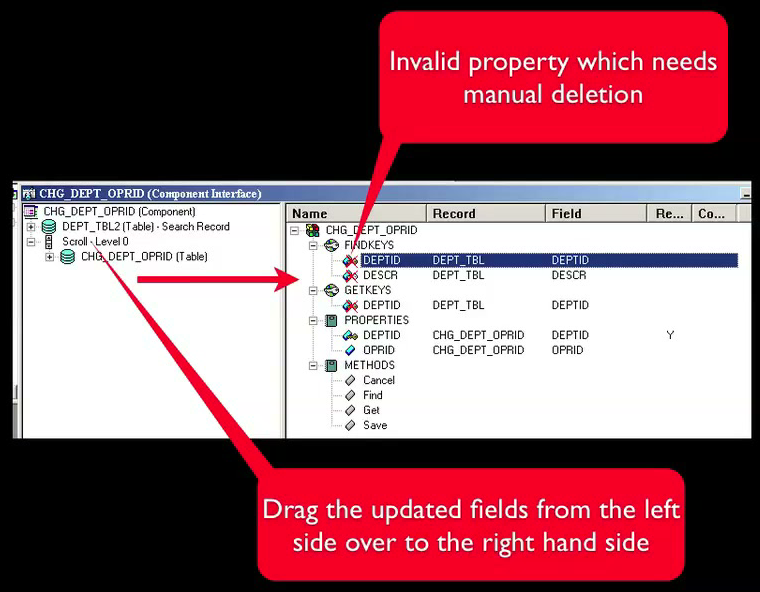
Always run Tools > Validate for Consistency on your Component Interface (or open it in Application Designer, delete the invalid red X nodes, and drag the updated fields from the left pane to the right pane) whenever the underlying Component is modified.
Memory Management: Local ApiObject and Resetting to Null
Component Interfaces allocate substantial C++ component buffer structures inside the Application Server or PSAESRV process.
- Always declare CI variables as
Local ApiObject(neverGlobalorComponentunless strictly necessary). - When looping over hundreds or thousands of rows in an Application Engine program or IB handler, call
&ci.Cancel()and set&ci = Null;after each transaction (or re-instantiate per step) so the Application Server releases the previous component buffer cleanly.
Non-Unique Search Keys and Numeric Key Formatting
Two subtle key-matching bugs frequently trip up .Get() calls:
- Non-Unique Search Keys: If a component’s Search Record can return multiple rows for the partial keys you supply,
.Get()fails because.Get()requires a single, unique match. Use.Find()to retrieve the matching collection, inspect the items, and call.Get()with the full unique keys. - Numeric Key Formatting: When a key property is numeric or zero-padded character, ensure the value passed to
GetKeysmatches the exact format stored in the database (Value()vs. zero-padded string).
psLens Operations & Intelligence
Look up any record, field, page, or component, audit security, and monitor Integration Broker across every database — in seconds.
- 30+ object types browsable
- 16 real-time alert types
- Read-only by design
- No App Designer or SQL required
psLens Operations & Intelligence
A web console built for the PeopleSoft community — operational monitoring, security auditing, and metadata browsing in one tool.
- Sub-second object search
- Catch stuck IB messages before users do
- Audit service permissions from one screen
- Works in any browser
psLens Operations & Intelligence
On-demand security and operational reports for your PeopleSoft environment — no client install required.
- 14 on-demand reports
- Markdown export for AI/LLM workflows
- No shared tenancy
- Built on 25+ years of PeopleSoft expertise
psLens Operations & Intelligence
Research any PeopleSoft object and monitor system health from a single browser tab — no App Designer, no SQL.
- 30+ PeopleSoft object types browsable
- Real-time alerts before users report problems
- Read-only and secure
- Private alpha — early access now
Chris Malek
Chris Malek is a PeopleTools® Technical Consultant with over two decades of experience. He is available for consulting engagements.
Work with ChrisSubscribe to Updates
PeopleSoft Simple Web Services
SWS turns SQL into production REST APIs — ready for AI, modern apps, and partner integrations. One install, unlimited potential.
- Configuration-driven, no coding required
- JSON, XML, and CSV output
- Works across all PeopleSoft pillars
- Built on 25+ years of PeopleSoft expertise
PeopleSoft Simple Web Services
A powerful PeopleSoft bolt-on that makes REST web services easy. You bring the SQL, SWS handles the rest.
- Go from idea to production in minutes
- Zero code migrations after install
- JSON, XML, and CSV output supported
- No PeopleCode or Integration Broker expertise required
PeopleSoft Simple Web Services
Traditional PeopleSoft web services cost $3,600–$13,000 each to develop. SWS deploys production REST APIs in under 5 minutes through configuration alone.
- No PeopleCode or Integration Broker expertise required
- Works across Campus Solutions, HCM, and Financials
- Built-in pagination, caching, and nested data structures
- Trusted by institutions across higher education and government
PeopleSoft Simple Web Services
Turn PeopleSoft data into clean REST APIs for AI integrations, modern applications, and vendor data feeds. Configuration-driven — no PeopleCode required.
- Deploy production APIs in under 5 minutes
- AI and LLM ready (RAG, chatbots, intelligent search)
- JSON, XML, and CSV output
- Zero modifications to delivered PeopleSoft objects