Contents
Contents
FULLSYNC Chunking Rules
The chunking rules allow you to configure which sets of data should be sent to what integration nodes during a FULLSYNC. It is common in large corporations or institutions to have a central database (e.g. Finance) that is the source of truth for setup data. However, there could be many different subscribing systems that only care about a subset of the data.
Here is a high level schematic that represents two systems that only care about subsets of business units in the project table:
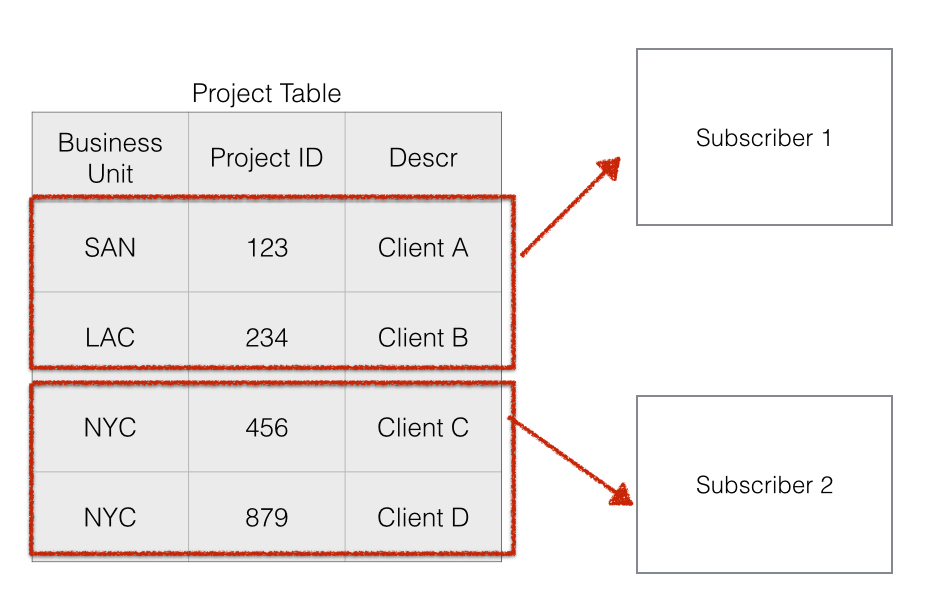
Using the FULLSYNC service operations and infrastructure, there is a delivered way with only configuration to limit what data is sent to each node using “chunking rules.”
Assumptions:
- Each subscriber has a unique integration broker node name in the database running the FULLSYNC publication.
- You want to partition the data by either SETID or BUSINESS_UNIT.
Configuring Business Unit Chunking Rules
First you need to map what node should receive what business unit:
Enterprise Components > Integration Definitions > Map Chunking Rules > Business Units
In this screenshot, we are sending the “SA” node two different business units. Any other business units that may exist in the source database will not be sent to the “SA” node.
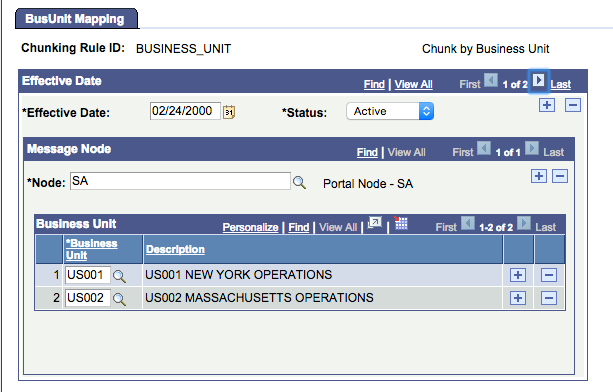
After you set up your node to BUSINESS_UNIT mapping, you then have to configure that chunking rule on the FULLSYNC:
Enterprise Components > Integration Definitions > Full Data Publish Rules
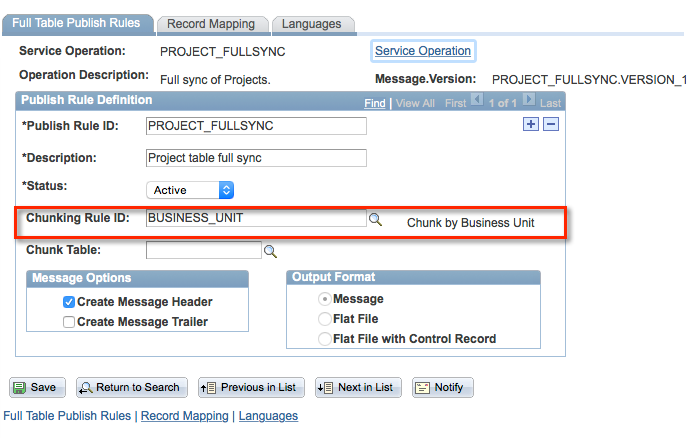
When the FULLSYNC runs, there has to be an active service operation routing to the node in the chunking rule or it will not publish outbound.
You can also set up SETID chunking rules as well.
Chunking Rules with SYNC Operations
The FULLSYNC chunking rules work great with the delivered FULLSYNC push processes and configuration. However, what happens when you have a near real-time “SYNC” operation configured which creates publications every time someone hits save on the data entry page?
In a vanilla configuration, if you had a “SYNC” operation turned on for a setup table (like project, department, location, etc.) the publication would go to all subscriber nodes. Delivered near-real-time SYNC operations do NOT honor any chunking rules. The SavePostChange PeopleCode triggers a SYNC operation and the integration broker will find all the nodes that have an active Service Operation Routing and create a publication contract to all nodes.
To apply chunking rules to SYNC operations, you need to implement an OnRouteSend handler. See the OnRouteSend section for a complete code example that reads the chunking rules at runtime and selectively publishes to nodes based on the BUSINESS_UNIT or SETID in the message.
psLens Operations & Intelligence
Look up any record, field, page, or component, audit security, and monitor Integration Broker across every database — in seconds.
- 30+ object types browsable
- 16 real-time alert types
- Read-only by design
- No App Designer or SQL required
psLens Operations & Intelligence
A web console built for the PeopleSoft community — operational monitoring, security auditing, and metadata browsing in one tool.
- Sub-second object search
- Catch stuck IB messages before users do
- Audit service permissions from one screen
- Works in any browser
psLens Operations & Intelligence
On-demand security and operational reports for your PeopleSoft environment — no client install required.
- 14 on-demand reports
- Markdown export for AI/LLM workflows
- No shared tenancy
- Built on 25+ years of PeopleSoft expertise
psLens Operations & Intelligence
Research any PeopleSoft object and monitor system health from a single browser tab — no App Designer, no SQL.
- 30+ PeopleSoft object types browsable
- Real-time alerts before users report problems
- Read-only and secure
- Private alpha — early access now
Chris Malek
Chris Malek is a PeopleTools® Technical Consultant with over two decades of experience. He is available for consulting engagements.
Work with ChrisSubscribe to Updates
PeopleSoft Simple Web Services
SWS turns SQL into production REST APIs — ready for AI, modern apps, and partner integrations. One install, unlimited potential.
- Configuration-driven, no coding required
- JSON, XML, and CSV output
- Works across all PeopleSoft pillars
- Built on 25+ years of PeopleSoft expertise
PeopleSoft Simple Web Services
A powerful PeopleSoft bolt-on that makes REST web services easy. You bring the SQL, SWS handles the rest.
- Go from idea to production in minutes
- Zero code migrations after install
- JSON, XML, and CSV output supported
- No PeopleCode or Integration Broker expertise required
PeopleSoft Simple Web Services
Traditional PeopleSoft web services cost $3,600–$13,000 each to develop. SWS deploys production REST APIs in under 5 minutes through configuration alone.
- No PeopleCode or Integration Broker expertise required
- Works across Campus Solutions, HCM, and Financials
- Built-in pagination, caching, and nested data structures
- Trusted by institutions across higher education and government
PeopleSoft Simple Web Services
Turn PeopleSoft data into clean REST APIs for AI integrations, modern applications, and vendor data feeds. Configuration-driven — no PeopleCode required.
- Deploy production APIs in under 5 minutes
- AI and LLM ready (RAG, chatbots, intelligent search)
- JSON, XML, and CSV output
- Zero modifications to delivered PeopleSoft objects