Contents
Contents
Real-World Walkthrough: Batch User Profile Load
Calling a Component Interface inside an Application Engine batch program or inbound integration requires careful transaction management. If you process 500 rows in a single loop without isolating commits and capturing row-level errors, a single bad row—or a single SaveEdit error—can abort the entire batch job or leave your database in an inconsistent state.
In this walkthrough, we build a complete batch import solution around the delivered USER_PROFILE Component Interface (USERMAINT component) that:
- Imports a comma-delimited user feed (
NEWhires andTERterminations) into a staging table. - Locks out terminated users (
AccountLocked = "1"). - Creates new users, populates their
EmailAddresses,IDTypes, andRolescollections, and generates a random password viaResetPassword(). - Evolves to handle idempotent upserts (“Create-or-Update”) when an existing user is re-sent in the feed with a new role (e.g., promoted to
Manager).
Designing the Staging Table (CHG_UP001_IMP)
Whenever you process batch records through a Component Interface, stage the data in a database table first rather than calling the CI directly from a flat-file read loop.
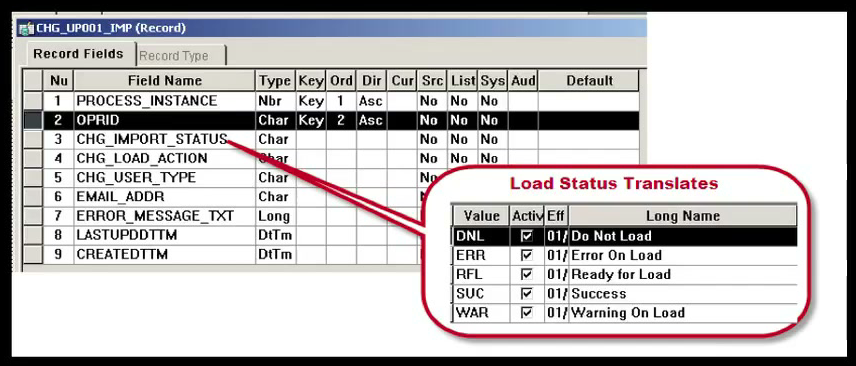
Key design elements of the staging table (CHG_UP001_IMP):
- Keys:
PROCESS_INSTANCE(Key 1) andOPRID(Key 2) allow multiple batches to reside in the staging table simultaneously and allow an administrator to search by batch or user ID. - Status Column (
CHG_IMPORT_STATUS): Uses five translate values to track each row’s lifecycle:RFL— Ready for Load (initial state after file import)DNL— Do Not Load (manually skipped by an administrator)SUC— Success (CISave()succeeded)WAR— Warning On Load (CISave()succeeded, but non-fatal warnings were logged inPSMessages)ERR— Error On Load (CI failed; row requires investigation and re-processing)
- Error Message Column (
ERROR_MESSAGE_TXT): ALong(LONG VARCHAR) column that stores the full text of any caught PeopleCode exception plus all messages from%Session.PSMessages.
Exposing this staging table on a simple PIA inquiry component gives functional administrators a self-service workbench where they can filter by Import Status = Error On Load, read the exact CI validation message, correct a bad email or role value on the staging row, flip the status back to Ready for Load, and re-run the load without re-importing the file.
Application Engine Commit Architecture
Why does an Application Engine program that calls a Component Interface need a specific section structure? Because when a Component Interface fails midway through populating buffers or executing Save(), any dirty changes in the CI or database session must not pollute subsequent rows, and each successful row must be committed independently.
Evaluates Run Control Flags"] -->|"If Import File = Y"| FILE_IMP["Section: FILE_IMP
Reads CSV & Inserts RFL Rows into CHG_UP001_IMP"] MAIN -->|"If Load to Component = Y"| USER_PRC["Section: USER_PRC (Do-While Loop)
Selects Next RFL Row into State Record"] USER_PRC -->|"Calls Section for 1 Row"| CI_SEC["Section: CI (Commit After Step)
Instantiates USER_PROFILE CI, Saves, Updates Staging Status"] CI_SEC -->|"Database Commit After Each Row"| USER_PRC
In the CI section, configure Step01 with Commit After: After Step:
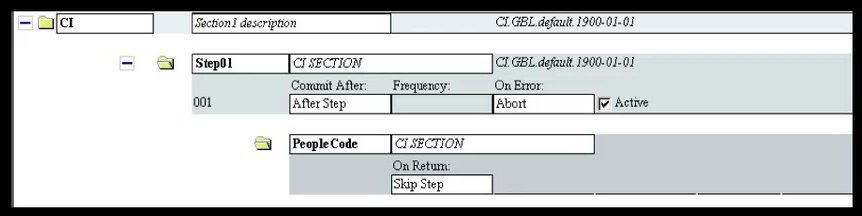
This guarantees that every iteration of the USER_PRC loop processes one user, updates that user’s staging row to SUC, WAR, or ERR, and immediately issues a database COMMIT before moving to the next user.
Step 1: Importing the Flat File (FILE_IMP)
The FILE_IMP section reads the inbound CSV file (OPRID,ACTION,USER_TYPE,EMAIL), splits each line on commas, and inserts rows with CHG_IMPORT_STATUS = "RFL" into PS_CHG_UP001_IMP:
Local File &fImport;
Local string &sLine;
Local array of string &aLine;
Local Record &rImport;

&fImport = GetFile(CHG_UP001_AET.ATTACHUSERFILE, "R", %FilePath_Absolute);
&rImport = CreateRecord(Record.CHG_UP001_IMP);

While &fImport.ReadLine(&sLine);
   &aLine = Split(&sLine, ",");
   &rImport.SetDefault();

   &rImport.PROCESS_INSTANCE.Value = CHG_UP001_AET.PROCESS_INSTANCE;
   &rImport.OPRID.Value = &aLine [1];
   &rImport.CHG_IMPORT_STATUS.Value = "RFL"; /* Ready for Load */
   &rImport.CHG_LOAD_ACTION.Value = &aLine [2];

   If &aLine.Len >= 3 Then
      &rImport.CHG_USER_TYPE.Value = &aLine [3];
   End-If;
   If &aLine.Len >= 4 Then
      &rImport.EMAIL_ADDR.Value = &aLine [4];
   End-If;

   &rImport.LASTUPDDTTM.Value = %Datetime;
   &rImport.CREATEDTTM.Value = %Datetime;
   &rImport.Insert();
End-While;
Step 2: Driving the Component Interface (CI Section)
Inside the CI section, we fetch the current staging row using a standalone Record object (SelectByKey), instantiate CompIntfc.USER_PROFILE, and branch on CHG_LOAD_ACTION.
Understanding Dummy Rows vs. InsertItem(1) in Collections
When Create() initializes a new USER_PROFILE instance, its EmailAddresses, IDTypes, and Roles collections each contain one pre-allocated dummy row at Item(1):
- For the first email address, ID type, and role (
Employee), we grab.Item(1)directly and populate its properties. - When the user is a Manager (
CHG_USER_TYPE = "MGR") and needs a second role (Manager), we must call&oRolesCollection.InsertItem(1)to insert a new row into the collection.
InsertItem(1) Works: Calling &oRolesCollection.InsertItem(1) inserts a new Role item relative to index 1 and returns a reference to the newly inserted ApiObject item. If you work with CurrentItem instead of explicit item references, InsertItem also shifts CurrentItem to the newly inserted row.Handling the Create-then-Get Upsert Evolution
What happens if JTOMSON was already created as a regular employee (EMP) in an earlier batch, and HR later sends a NEW row for JTOMSON with MGR because she was promoted to Manager?
- Calling
&oUserProfile.Create()for an existingOPRIDreturnsFalseand logsRow already exists with the specified keys. {USER_PROFILE} (91,49)to%Session.PSMessages. - To make the integration idempotent (capable of both creating new users and updating existing ones), if
.Create()returnsFalse, we clear%Session.PSMessages, populate theGetKeys, and fall back to.Get()! - When updating an existing user via
.Get(), theirRolescollection is not empty—it already contains their existing roles (Employee, etc.). Therefore, instead of blindly overwritingItem(1)or blindly callingInsertItem(1), we loop through1 To &oRolesCollection.Countto check whetherEmployeeorManageris already present, and only callInsertItem(1)for missing roles.
Here is the complete, production-ready PeopleCode for the CI section:
Local ApiObject &oSession, &oUserProfile;
Local ApiObject &oEmailAddressesCollection, &oEmailAddresses;
Local ApiObject &oIdTypesCollection, &oIdTypes, &oAttributesCollection, &oAttributes;
Local ApiObject &oRolesCollection, &oRoles;
Local Record &recImport;
Local string &error_message;
Local boolean &bNewPassword, &bFoundEmpRole, &bFoundMgrRole;
Local integer &i;

Function errorHandler() Returns string
   Local ApiObject &oPSMessageCollection, &oPSMessage;
   Local number &j;
   Local string &sErrMsgSetNum, &sErrMsgNum, &sErrMsgText, &sReturn;

   &oPSMessageCollection = &oSession.PSMessages;
   For &j = 1 To &oPSMessageCollection.Count
      &oPSMessage = &oPSMessageCollection.Item(&j);
      &sErrMsgSetNum = &oPSMessage.MessageSetNumber;
      &sErrMsgNum = &oPSMessage.MessageNumber;
      &sErrMsgText = &oPSMessage.Text;
      &sReturn = &sReturn | "<<<<< (" | &j | ") " | &sErrMsgText | " [" | &sErrMsgSetNum | "," | &sErrMsgNum | "] >>>>>" | Char(13);
   End-For;
   &oPSMessageCollection.DeleteAll();
   Return &sReturn;
End-Function;

/* Load current staging row */
&recImport = CreateRecord(Record.CHG_UP001_IMP);
&recImport.PROCESS_INSTANCE.Value = CHG_UP001_AET.PROCESS_INSTANCE;
&recImport.OPRID.Value = CHG_UP001_AET.OPRID;
If Not &recImport.SelectByKey() Then
   throw CreateException(0, 0, "Logic error: could not select staging row.");
End-If;

try
   &oSession = %Session;
   &oSession.PSMessagesMode = 1;

   &oUserProfile = &oSession.GetCompIntfc(CompIntfc.USER_PROFILE);
   If &oUserProfile = Null Then
      throw CreateException(0, 0, "Could not instantiate USER_PROFILE CI.");
   End-If;

   &oUserProfile.InteractiveMode = True;
   &oUserProfile.GetHistoryItems = True;
   &oUserProfile.EditHistoryItems = False;

   /* Set Key property (used by both Get and Create) */
   &oUserProfile.UserID = &recImport.OPRID.Value;

   Evaluate &recImport.CHG_LOAD_ACTION.Value
   When = "TER" /* Terminate / Lock Out User */
      If Not &oUserProfile.Get() Then
         throw CreateException(0, 0, "Could not get User Profile on Search Record.");
      End-If;
      &oUserProfile.AccountLocked = "1";
      Break;

   When = "NEW" /* Create or Update User */
      If &oUserProfile.Create() Then
         /* --- BRAND NEW USER --- */
         &bNewPassword = True;
         &oUserProfile.PrimaryPermissionList = "ALLPAGES";
         &oUserProfile.ProcessProfilePermissionList = "ALLPAGES";
         &oUserProfile.RowSecurityPermissionList = "ALLPAGES";

         /* Populate Dummy Row Item(1) on EmailAddresses */
         &oEmailAddressesCollection = &oUserProfile.EmailAddresses;
         &oEmailAddresses = &oEmailAddressesCollection.Item(1);
         &oEmailAddresses.EmailType = "BUS";
         &oEmailAddresses.EmailAddress = &recImport.EMAIL_ADDR.Value;
         &oEmailAddresses.PrimaryEmail = "Y";

         /* Populate Dummy Row Item(1) on IDTypes */
         &oIdTypesCollection = &oUserProfile.IDTypes;
         &oIdTypes = &oIdTypesCollection.Item(1);
         &oIdTypes.IDType = "NON";

         /* Populate Dummy Row Item(1) on Roles */
         &oRolesCollection = &oUserProfile.Roles;
         &oRoles = &oRolesCollection.Item(1);
         &oRoles.RoleName = "Employee";

         If &recImport.CHG_USER_TYPE.Value = "MGR" Then
            &oRoles = &oRolesCollection.InsertItem(1);
            &oRoles.RoleName = "Manager";
         End-If;

      Else
         /* --- CREATE FAILED: FALL BACK TO GET() FOR EXISTING USER --- */
         &oSession.PSMessages.DeleteAll();
         &oUserProfile.UserID = &recImport.OPRID.Value;

         If Not &oUserProfile.Get() Then
            throw CreateException(0, 0, "Could not Create or Get User Profile.");
         End-If;

         /* Inspect existing roles before inserting */
         &oRolesCollection = &oUserProfile.Roles;
         &bFoundEmpRole = False;
         &bFoundMgrRole = False;

         For &i = 1 To &oRolesCollection.Count
            &oRoles = &oRolesCollection.Item(&i);
            If &oRoles.RoleName = "Employee" Then
               &bFoundEmpRole = True;
            End-If;
            If &oRoles.RoleName = "Manager" Then
               &bFoundMgrRole = True;
            End-If;
         End-For;

         If Not &bFoundEmpRole Then
            &oRoles = &oRolesCollection.InsertItem(1);
            &oRoles.RoleName = "Employee";
         End-If;

         If (&recImport.CHG_USER_TYPE.Value = "MGR") And (Not &bFoundMgrRole) Then
            &oRoles = &oRolesCollection.InsertItem(1);
            &oRoles.RoleName = "Manager";
         End-If;
      End-If;
      Break;
   End-Evaluate;

   /* Save the Component Interface */
   If Not &oUserProfile.Save() Then
      throw CreateException(0, 0, "Could not save User Profile.");
   End-If;

   /* Execute Custom Method ResetPassword() only for newly created users */
   If &bNewPassword Then
      If Not &oUserProfile.ResetPassword() Then
         throw CreateException(0, 0, "Could not reset password.");
      End-If;
      &recImport.ERROR_MESSAGE_TXT.Value = "New Password=" | &oUserProfile.GeneratedPassword;
   End-If;

   /* Check if any non-fatal warnings were logged to PSMessages */
   If &oSession.PSMessages.Count > 0 Then
      &recImport.CHG_IMPORT_STATUS.Value = "WAR";
      &recImport.ERROR_MESSAGE_TXT.Value = &recImport.ERROR_MESSAGE_TXT.Value | Char(13) | errorHandler();
   Else
      &recImport.CHG_IMPORT_STATUS.Value = "SUC";
   End-If;

   &recImport.LASTUPDDTTM.Value = %Datetime;
   &recImport.Update();

catch Exception &caught
   /* Capture both the Exception and PSMessages onto the staging row */
   &error_message = "Error Caught: [[ " | &caught.ToString() | " ]]" | Char(13) | errorHandler();
   &recImport.ERROR_MESSAGE_TXT.Value = &error_message;
   &recImport.CHG_IMPORT_STATUS.Value = "ERR";
   &recImport.LASTUPDDTTM.Value = %Datetime;
   &recImport.Update();

   /* Cancel CI buffer and clean up reference */
   If &oUserProfile <> Null Then
      &oUserProfile.Cancel();
   End-If;
end-try;
Triaging Batch Errors in PIA
Because our catch block writes both &caught.ToString() and the formatted errorHandler() output (%Session.PSMessages) into CHG_UP001_IMP.ERROR_MESSAGE_TXT while allowing the Application Engine step to complete and commit cleanly:
- Process Monitor shows
Success, meaning the batch job processed every valid user in the file without aborting on the first bad row. - Functional users can open the staging table inquiry page in PIA, filter by
Import Status = Error On Load, and immediately see both where the PeopleCode failed and why the Component Processor rejected the row:
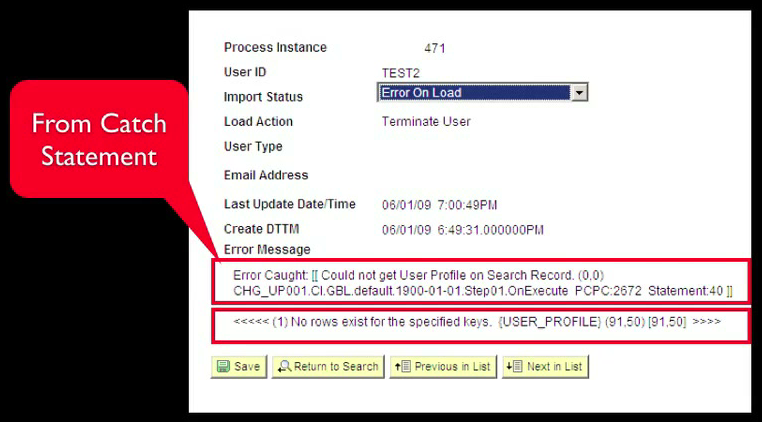
Success, always add a final notification step (or PSQuery / Workcenter alert) that checks SELECT COUNT(*) FROM PS_CHG_UP001_IMP WHERE PROCESS_INSTANCE = :1 AND CHG_IMPORT_STATUS IN ('ERR', 'WAR') and emails or alerts the administrator if any rows require attention.psLens Operations & Intelligence
Look up any record, field, page, or component, audit security, and monitor Integration Broker across every database — in seconds.
- 30+ object types browsable
- 16 real-time alert types
- Read-only by design
- No App Designer or SQL required
psLens Operations & Intelligence
A web console built for the PeopleSoft community — operational monitoring, security auditing, and metadata browsing in one tool.
- Sub-second object search
- Catch stuck IB messages before users do
- Audit service permissions from one screen
- Works in any browser
psLens Operations & Intelligence
On-demand security and operational reports for your PeopleSoft environment — no client install required.
- 14 on-demand reports
- Markdown export for AI/LLM workflows
- No shared tenancy
- Built on 25+ years of PeopleSoft expertise
psLens Operations & Intelligence
Research any PeopleSoft object and monitor system health from a single browser tab — no App Designer, no SQL.
- 30+ PeopleSoft object types browsable
- Real-time alerts before users report problems
- Read-only and secure
- Private alpha — early access now
Chris Malek
Chris Malek is a PeopleTools® Technical Consultant with over two decades of experience. He is available for consulting engagements.
Work with ChrisSubscribe to Updates
PeopleSoft Simple Web Services
SWS turns SQL into production REST APIs — ready for AI, modern apps, and partner integrations. One install, unlimited potential.
- Configuration-driven, no coding required
- JSON, XML, and CSV output
- Works across all PeopleSoft pillars
- Built on 25+ years of PeopleSoft expertise
PeopleSoft Simple Web Services
A powerful PeopleSoft bolt-on that makes REST web services easy. You bring the SQL, SWS handles the rest.
- Go from idea to production in minutes
- Zero code migrations after install
- JSON, XML, and CSV output supported
- No PeopleCode or Integration Broker expertise required
PeopleSoft Simple Web Services
Traditional PeopleSoft web services cost $3,600–$13,000 each to develop. SWS deploys production REST APIs in under 5 minutes through configuration alone.
- No PeopleCode or Integration Broker expertise required
- Works across Campus Solutions, HCM, and Financials
- Built-in pagination, caching, and nested data structures
- Trusted by institutions across higher education and government
PeopleSoft Simple Web Services
Turn PeopleSoft data into clean REST APIs for AI integrations, modern applications, and vendor data feeds. Configuration-driven — no PeopleCode required.
- Deploy production APIs in under 5 minutes
- AI and LLM ready (RAG, chatbots, intelligent search)
- JSON, XML, and CSV output
- Zero modifications to delivered PeopleSoft objects