Contents
Contents
Understanding SOAP versus REST versus HTTP web services in PeopleSoft
This section pertains to synchronous web services which we will go into great detail in the later sections of this book.
Synchronous Service Operations are characterized as a request/response interaction style. The client sends in some request to PeopleSoft and it waits while PeopleSoft gets or updates data and generates a response and sends it back.
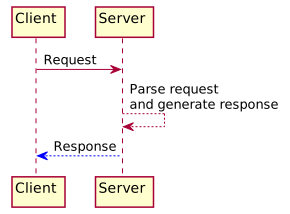
There are 3 different ways you can invoke these types of service operations.
- REST
- HTTP Post
- SOAP
REST
REST uses the HTTP protocol extensively. It attempts make use of many of the HTTP protocal features including HTTP verbs (PUT, POST, DELETE, GET) and HTTP Status codes. REST was introduced in the Integration Broker with PeopleTools 8.52.
With REST:
- Clients submit requests to the RESTListeningConnector
- The name of the service operation being called is included as part of the URL path.
- Parameters could be mixed into the URL query string, URL path and HTTP Body depending on the API design.
- No Integration Broker
nodesare used - The security mechanism is generally using “basic auth” tied to a
PSOPRDEFN.OPRIDand password. - Unit testing in Postman is very easy.
- The JSON support prior to 8.56 was extremely limited. Therefore, XML data format is the most supported encoding scheme.
Read more in the REST Introduction section
HTTP Post
Until REST was introduced in PeopleTools 8.52, the HTTP Post method via HttpListeningConnector was the best and most simple way to call service operations for external clients. This is more of an RPC style web service.
With HTTP Post:
- Clients submit requests to the HttpListeningConnector
- Normally XML data is submitted in the request and XML is returned. There is some support for other content types but XML is generally the default.
- The security mechanism is generally handled through HTTP headers and node settings.
- They are fairly easy to test and work with in an HTTP testing tool.
SOAP
SOAP is old, SOAP is bloated, SOAP does not make you clean (but soap does). Unless you absolutely have to use SOAP for some reason, I recommend using one of the other styles of messaging. This book will spend very little time discussing SOAP.
With SOAP:
- clients submit requests to the PeopleSoftServiceListeningConnector
- Messages must have a SOAP wrapper
- This make testing not as simple as the other methods.
- Error responses are wrapped in a SOAP
faultmessage - Security is handled differently that the other methods and is arguably more complex.
Random Reasons NOT to use SOAP:
- It relies on the client to import SOAP libraries to that lead to more code dependencies.
- There can be subtle differences between PeopleSoft’s SOAP implementation and your client’s libraries leading to bugs and inconsistencies.
- Unit testing SOAP services with a tester tool like Postman is hard because the message structure is complex.
- WSDLs and XSD are a pain to work with and PeopleTools has basic support and lots of rough edges.
- Additionally, I don’t really think WSDL’s and XSD provide that much functionality. They may give a 10,000 foot picture of the messages involved and maybe the URLs. However, they don’t get involved in the gritty detail at the field level and how different fields interact with one another. For example, if you give value “x” for field “A”, then the options for field “B” become limited further. That is not covered in those schema and where I find that 99% of the client code has to deal with.
- The documentation from Oracle is completely lacking. There are no start to finish examples, there are conflicting documentation articles, etc.
Example of SOAP Complexity - Workday SOAP API
Let me show you a real example a project I worked on where PeopleSoft Campus needed to update an employee’s email in Workday. Since Workday is basically SOAP you are forced into this paradigm if you are integrating with Workday.
The SOAP required to start a “Business Process” in workday looked like this.
<?xml version="1.0"?>
<soapenv:Envelope xmlns:bsvc="urn:com.workday/bsvc"
  xmlns:soapenv="<http://schemas.xmlsoap.org/soap/envelope/>">
  <soapenv:Header>
    <wsse:Security soapenv:mustUnderstand="1"
      xmlns:wsse="<http://docs.oasis-open.org/wss/2004/01/oasis-200401-wss-wssecurity-secext-1.0.xsd>"
      xmlns:wsu="<http://docs.oasis-open.org/wss/2004/01/oasis-200401-wss-wssecurity-utility-1.0.xsd>">
      <wsse:UsernameToken>
        <wsse:Username>{{some-user}}</wsse:Username>
        <wsse:Password Type="<http://docs.oasis-open.org/wss/2004/01/oasis-200401-wss-username-token-profile-1.0#PasswordText>">{{some-password}}</wsse:Password>
      </wsse:UsernameToken>
    </wsse:Security>
  </soapenv:Header>
  <soapenv:Body>
    <bsvc:Change_Work_Contact_Information_Request bsvc:version="v39.0">
      <bsvc:Business_Process_Parameters>
        <bsvc:Auto_Complete>true</bsvc:Auto_Complete>
        <bsvc:Run_Now>true</bsvc:Run_Now>
      </bsvc:Business_Process_Parameters>
      <bsvc:Change_Work_Contact_Information_Data>
        <bsvc:Person_Reference>
          <bsvc:ID bsvc:type="Contingent_Worker_ID">100003904</bsvc:ID>
        </bsvc:Person_Reference>
        <bsvc:Event_Effective_Date>2026-05-15</bsvc:Event_Effective_Date>
        <bsvc:Person_Contact_Information_Data>
          <bsvc:Person_Email_Information_Data bsvc:Replace_All="true">
            <bsvc:Email_Information_Data bsvc:Delete="false">
              <bsvc:Email_Data>
                <bsvc:Email_Address>jdoe@acmecorp.com</bsvc:Email_Address>
                <bsvc:Email_Comment>Company issued email</bsvc:Email_Comment>
              </bsvc:Email_Data>
              <bsvc:Usage_Data bsvc:Public="true">
                <bsvc:Type_Data bsvc:Primary="true">
                  <bsvc:Type_Reference>
                    <bsvc:ID bsvc:type="Communication_Usage_Type_ID">Work</bsvc:ID>
                  </bsvc:Type_Reference>
                </bsvc:Type_Data>
                <bsvc:Comments>Company issued email</bsvc:Comments>
              </bsvc:Usage_Data>
            </bsvc:Email_Information_Data>
          </bsvc:Person_Email_Information_Data>
        </bsvc:Person_Contact_Information_Data>
      </bsvc:Change_Work_Contact_Information_Data>
    </bsvc:Change_Work_Contact_Information_Request>
  </soapenv:Body>
</soapenv:Envelope>
In Workday, you don’t update the data directly you start a “Business Process” and that business process updates the data. So you have to submit a request to start that business process. The above is the SOAP message required to start that business process. It is just so much noise and complexity to do something that should be simple. You have to know about SOAP envelopes, namespaces, security headers, etc. just to get to the actual data you want to update. It is just a mess. There was some further oddities where Workday could error out if there was some other “Business Process” in approval for the same worker. So you could get an error. However, that is not the core complaint with SOAP I am talking about here.
There alternative JSON for this might look like this in some fictitious REST/HTTP API that is not SOAP.
{
  "personId": "100003904",
  "eventEffectiveDate": "2026-05-15",
  "emailAddress": "jdoe@acmecorp.com",
  "emailComment": "Company issued email",
  "emailType": "Work",
  "emailUsage": "Public"
}
All of that SOAP preample is just noise. It is just a wrapper that adds no value. The JSON version is much more concise and gets right to the point.
It is much easier to reason about, loook at and test in something like curl. When you bring AI code generation into the mix, it is much easier to generate the JSON version than the SOAP version. The SOAP version requires you to know about all of the SOAP specific details and get those right in order for it to work. The JSON version is much more forgiving and easier to generate.
Just tell me which one to use
- SOAP is out.
- The choice is between HTTP and REST.
If you are developing a bespoke solution for your specific organization and you are on the latest tools release then REST might be the way to go.
If you are a software vendor developing a PeopleSoft web service that needs to be deployed to unknown clients then HTTP might be a safer bet. I do a lot of work here. I have different clients that have software products that need to integrate with PeopleSoft. I have developed standard PeopleSoft web services that are deployed to various client sites that integrate with these products. In this situation you cannot target the most up to date PeopleSoft release. What often happens in this situation is that a client might be on an older PeopleSoft release and you need to have the code developed in a manner that will work for all possible clients. In this situation, I use HTTP and XML because it will be portable across a very wide range of clients. The software application talking to these web services will just know how to talk to those web services. The number of People in this situation is likely small.
To be honest I don’t see a huge difference between REST and HTTP due to the way PeopleSoft is structured. I will cover this more in later sections.
Opinion’s From Around the Web
- Simplicity and Utility, or, Why SOAP Lost
- REST Vs SOAP, The Difference Between Soap And Rest
- RESTful API Tutorial
psLens Operations & Intelligence
Look up any record, field, page, or component, audit security, and monitor Integration Broker across every database — in seconds.
- 30+ object types browsable
- 16 real-time alert types
- Read-only by design
- No App Designer or SQL required
psLens Operations & Intelligence
A web console built for the PeopleSoft community — operational monitoring, security auditing, and metadata browsing in one tool.
- Sub-second object search
- Catch stuck IB messages before users do
- Audit service permissions from one screen
- Works in any browser
psLens Operations & Intelligence
On-demand security and operational reports for your PeopleSoft environment — no client install required.
- 14 on-demand reports
- Markdown export for AI/LLM workflows
- No shared tenancy
- Built on 25+ years of PeopleSoft expertise
psLens Operations & Intelligence
Research any PeopleSoft object and monitor system health from a single browser tab — no App Designer, no SQL.
- 30+ PeopleSoft object types browsable
- Real-time alerts before users report problems
- Read-only and secure
- Private alpha — early access now
Chris Malek
Chris Malek is a PeopleTools® Technical Consultant with over two decades of experience. He is available for consulting engagements.
Work with ChrisSubscribe to Updates
PeopleSoft Simple Web Services
SWS turns SQL into production REST APIs — ready for AI, modern apps, and partner integrations. One install, unlimited potential.
- Configuration-driven, no coding required
- JSON, XML, and CSV output
- Works across all PeopleSoft pillars
- Built on 25+ years of PeopleSoft expertise
PeopleSoft Simple Web Services
A powerful PeopleSoft bolt-on that makes REST web services easy. You bring the SQL, SWS handles the rest.
- Go from idea to production in minutes
- Zero code migrations after install
- JSON, XML, and CSV output supported
- No PeopleCode or Integration Broker expertise required
PeopleSoft Simple Web Services
Traditional PeopleSoft web services cost $3,600–$13,000 each to develop. SWS deploys production REST APIs in under 5 minutes through configuration alone.
- No PeopleCode or Integration Broker expertise required
- Works across Campus Solutions, HCM, and Financials
- Built-in pagination, caching, and nested data structures
- Trusted by institutions across higher education and government
PeopleSoft Simple Web Services
Turn PeopleSoft data into clean REST APIs for AI integrations, modern applications, and vendor data feeds. Configuration-driven — no PeopleCode required.
- Deploy production APIs in under 5 minutes
- AI and LLM ready (RAG, chatbots, intelligent search)
- JSON, XML, and CSV output
- Zero modifications to delivered PeopleSoft objects