Contents
Contents
CI Tester and Code Templates
Once your Component Interface definition is saved and secured in a Permission List, never jump straight into writing PeopleCode. Always validate the Component Interface interactively using Application Designer’s built-in Component Interface Tester first.
Validating Behaviour in the CI Tester
With the Component Interface open in Application Designer, select Tools > Test Component Interface from the menu bar.
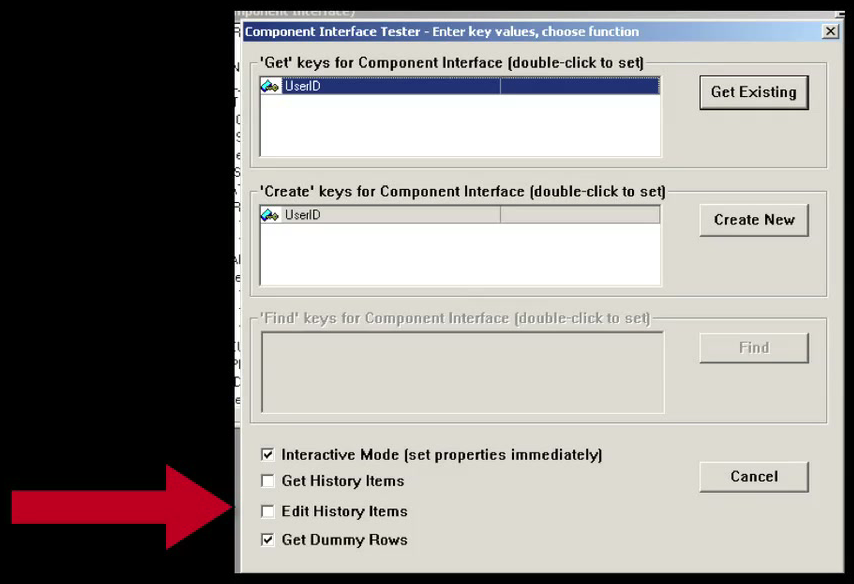
Understanding the CI Tester Startup Options
The CI Tester launch dialog exposes four checkboxes at the bottom that mirror the runtime properties you will set in PeopleCode:
- Interactive Mode (set properties immediately): Equivalent to
&ci.InteractiveMode = True. Leave this checked when testing complex components whoseFieldChangeevents populate downstream defaults. - Get History Items: Equivalent to
&ci.GetHistoryItems = True. - Edit History Items: Equivalent to
&ci.EditHistoryItems = True. - Get Dummy Rows: Checked by default in the CI Tester (and always active at runtime in PeopleCode). When a scroll collection is initially empty on
Create()(orGet()), PeopleTools automatically allocates a single placeholder row atItem(1)—just like the blank row 1 you see on an empty grid in PIA.
Get Dummy Rows Matters for Your Code: If you uncheck Get Dummy Rows in the CI Tester, empty collections will show 0 items and force you to call InsertItem(1) for the very first row. However, at runtime in PeopleCode, dummy rows are always present on empty collections! Always leave Get Dummy Rows checked in the CI Tester so the tester’s collection behavior matches what your PeopleCode will encounter at runtime.Testing Create New and Get Existing
Double-click the key field under ‘Create’ keys for Component Interface (for example, UserID = TEST10) and click Create New (or enter a key under ‘Get’ keys and click Get Existing).
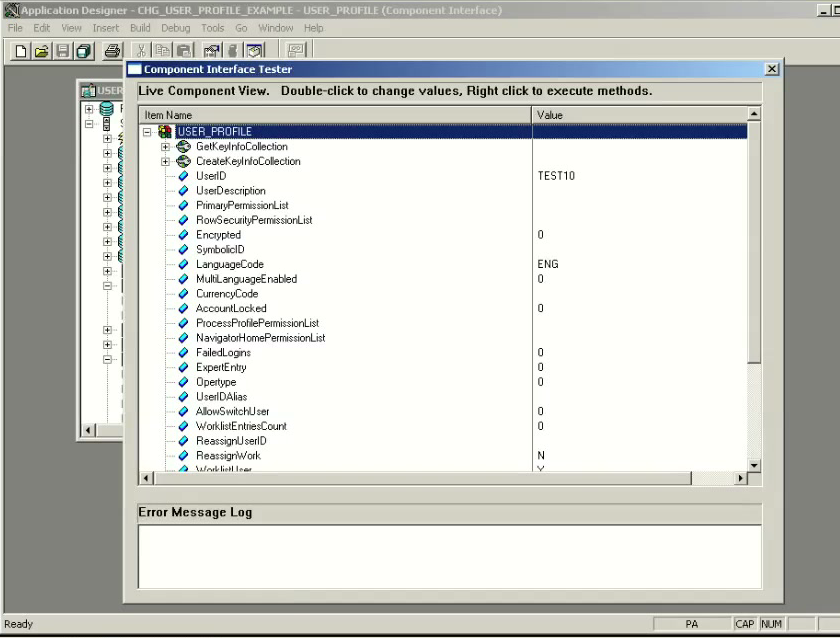
The Live Component View displays every exposed Level 0 property alongside the default values populated by RowInit and FieldDefault PeopleCode (for example, LanguageCode = ENG, WorklistUser = Y, EmailUser = Y).
Populating Collections and Calling InsertItem(1)
Scroll down to the Level 1 Data Collections (EmailAddresses, IDTypes, Roles). Because Get Dummy Rows is active, each collection already contains a pre-allocated [1] item (EmailAddresses [1], IDTypes [1], Roles [1]):
![Expanded EmailAddresses, IDTypes, and Roles collections in CI Tester showing dummy row [1] populated](../assets/ci-tester-collections-dummy-rows.png)
- To populate the first row of a collection, expand item
[1]and double-click its properties (EmailType = BUS,EmailAddress = T@SOME.COM,PrimaryEmail = Y,RoleName = Employee). - To add a second row to a collection (such as a second Role), right-click the Data Collection cube icon (
Roles)—not the item icon—and selectInsertItem. Enter1(or the current item index) in theindex [Number]prompt and click OK.
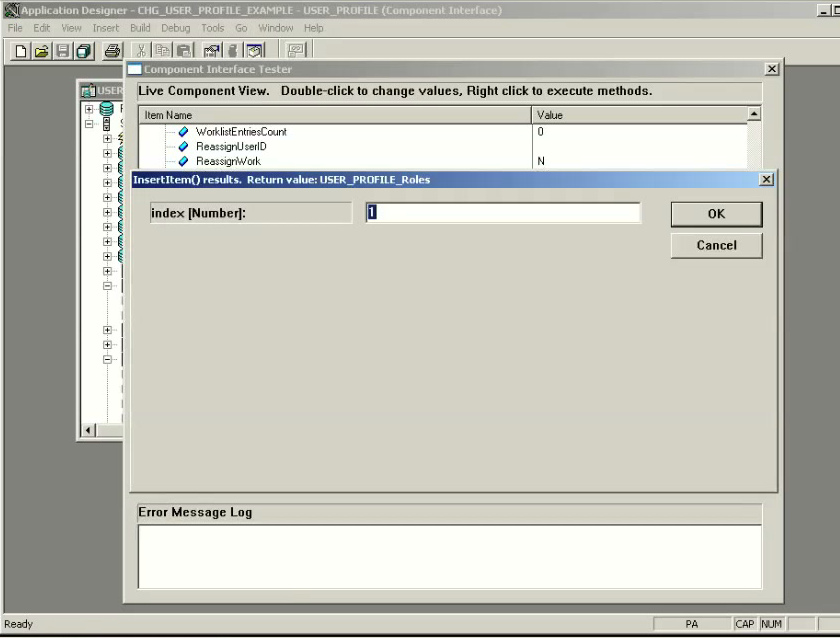
Executing Standard and Custom Methods
To execute Save(), Cancel(), or a custom method like ResetPassword(), scroll to the top of the CI Tester tree, right-click the root Component Interface icon (USER_PROFILE), and choose the method from the context menu.
- Calling
Saveruns allSaveEdit,SavePreChange, andSavePostChangePeopleCode and commits the new row to the database! IfSave()returns1(True), you can immediately verify the newly created user in PIA. IfSave()returns0(False), inspect the Error Message Log pane at the bottom of the CI Tester window to see the exactPSMessagesvalidation errors.
Generating the PeopleCode Template
Once your transaction succeeds in the CI Tester, open any PeopleCode editor window (or an Application Engine PeopleCode action) in Application Designer and drag the Component Interface definition from the Project tree into the PeopleCode editor.
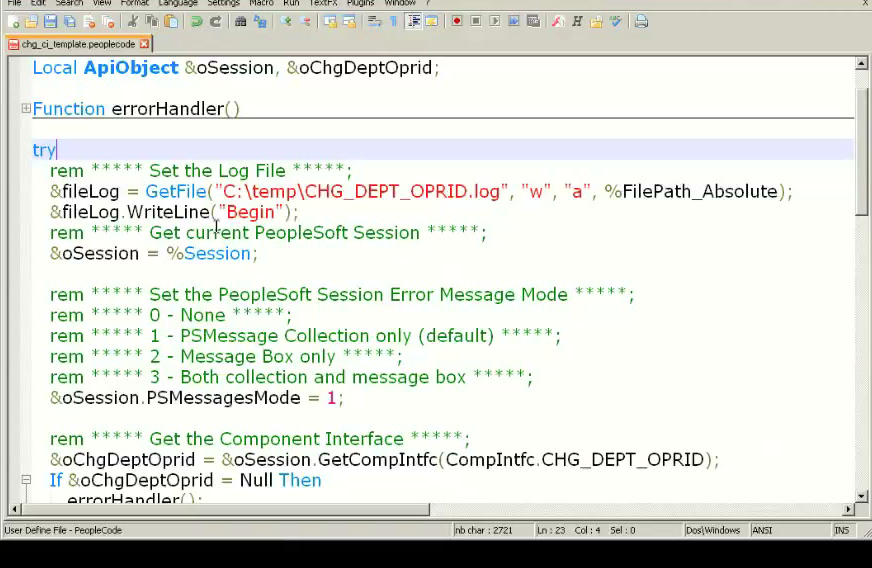
Application Designer generates a complete boilerplate PeopleCode script (~150 to 500+ lines depending on component complexity).
How to Use the Auto-Generated Template Properly: Never leave the raw drag-and-drop template code in production as-is. Its auto-generated rem comments and rigid top-to-bottom structure should never dictate your program’s control flow. Instead, drag the CI into a scratch text editor (like Notepad++ or VS Code) and use it as a copy-paste reference for:
- The
errorHandler()function that iterates%Session.PSMessages. - Exact property and collection names (preventing late-binding typos).
- How each collection’s item properties are nested.
Complete Level-0 CI Code Sample (CHG_DEPT_OPRID)
Below is the cleaned-up, production-ready PeopleCode pattern for updating a simple Level-0 Component Interface (CHG_DEPT_OPRID), based on the auto-generated template:
Local ApiObject &oSession, &oChgDeptOprid;

Function errorHandler()
   Local ApiObject &oPSMessageCollection, &oPSMessage;
   Local number &i;
   Local string &sErrMsgSetNum, &sErrMsgNum, &sErrMsgText, &sErrType;

   &oPSMessageCollection = &oSession.PSMessages;
   For &i = 1 To &oPSMessageCollection.Count
      &oPSMessage = &oPSMessageCollection.Item(&i);
      &sErrMsgSetNum = &oPSMessage.MessageSetNumber;
      &sErrMsgNum = &oPSMessage.MessageNumber;
      &sErrMsgText = &oPSMessage.Text;
      MessageBox(0, "", 0, 0, &sErrType | " (" | &sErrMsgSetNum | "," | &sErrMsgNum | ") - " | &sErrMsgText);
   End-For;
   /* Always clear PSMessages after reading so stale errors do not carry over */
   &oPSMessageCollection.DeleteAll();
End-Function;

try
   /* 1. Get current PeopleSoft Session and direct errors to PSMessages collection */
   &oSession = %Session;
   &oSession.PSMessagesMode = 1;

   /* 2. Instantiate the Component Interface */
   &oChgDeptOprid = &oSession.GetCompIntfc(CompIntfc.CHG_DEPT_OPRID);
   If &oChgDeptOprid = Null Then
      errorHandler();
      throw CreateException(0, 0, "GetCompIntfc failed");
   End-If;

   /* 3. Set behavioral modes */
   &oChgDeptOprid.InteractiveMode = False;
   &oChgDeptOprid.GetHistoryItems = True;
   &oChgDeptOprid.EditHistoryItems = False;

   /* 4. Populate GetKeys and call Get() */
   &oChgDeptOprid.DEPTID = "10500";
   If Not &oChgDeptOprid.Get() Then
      errorHandler();
      throw CreateException(0, 0, "Get failed for DEPTID=10500");
   End-If;

   /* 5. Set Level 0 properties */
   &oChgDeptOprid.OPRID = "VP1";

   /* 6. Save and check return value */
   If Not &oChgDeptOprid.Save() Then
      errorHandler();
      throw CreateException(0, 0, "Save failed");
   End-If;

catch Exception &caught
   MessageBox(0, "", 0, 0, "Caught exception: " | &caught.ToString());
end-try;
Recognizing Common Runtime Errors
When testing your PeopleCode, you will encounter three classic error signatures in %Session.PSMessages:
Error Message in PSMessages |
Root Cause | Fix |
|---|---|---|
Not Authorized (90,6) |
The runtime user (%OperatorId) lacks Permission List authorization for the CI, or you added the CI to the Permission List without clicking Edit -> Full Access before saving. |
Open the user’s Permission List, go to Component Interfaces, click Edit next to the CI, click Full Access (All), click OK, and click Save. |
(1) No rows exist for the specified keys. {CI_NAME} (91,50) |
.Get() was called with GetKeys that either do not exist in the search record table/view or are filtered out by the component’s search record security. |
Verify the key values exist in the Component’s Search Record (not just the base table), or use .Create() if the record allows Add. |
This is an invalid property {CI_NAME.PROP_TYPO} (91,15) |
A property name was misspelled in PeopleCode (e.g., &oChgDeptOprid.OPRD = "VP1" instead of .OPRID). |
Because &ci is typed as a generic ApiObject, property names are late-bound at runtime and are not checked by the PeopleCode compiler! Always check PSMessages.Count or wrap CI calls thoroughly. |
psLens Operations & Intelligence
Look up any record, field, page, or component, audit security, and monitor Integration Broker across every database — in seconds.
- 30+ object types browsable
- 16 real-time alert types
- Read-only by design
- No App Designer or SQL required
psLens Operations & Intelligence
A web console built for the PeopleSoft community — operational monitoring, security auditing, and metadata browsing in one tool.
- Sub-second object search
- Catch stuck IB messages before users do
- Audit service permissions from one screen
- Works in any browser
psLens Operations & Intelligence
On-demand security and operational reports for your PeopleSoft environment — no client install required.
- 14 on-demand reports
- Markdown export for AI/LLM workflows
- No shared tenancy
- Built on 25+ years of PeopleSoft expertise
psLens Operations & Intelligence
Research any PeopleSoft object and monitor system health from a single browser tab — no App Designer, no SQL.
- 30+ PeopleSoft object types browsable
- Real-time alerts before users report problems
- Read-only and secure
- Private alpha — early access now
Chris Malek
Chris Malek is a PeopleTools® Technical Consultant with over two decades of experience. He is available for consulting engagements.
Work with ChrisSubscribe to Updates
PeopleSoft Simple Web Services
SWS turns SQL into production REST APIs — ready for AI, modern apps, and partner integrations. One install, unlimited potential.
- Configuration-driven, no coding required
- JSON, XML, and CSV output
- Works across all PeopleSoft pillars
- Built on 25+ years of PeopleSoft expertise
PeopleSoft Simple Web Services
A powerful PeopleSoft bolt-on that makes REST web services easy. You bring the SQL, SWS handles the rest.
- Go from idea to production in minutes
- Zero code migrations after install
- JSON, XML, and CSV output supported
- No PeopleCode or Integration Broker expertise required
PeopleSoft Simple Web Services
Traditional PeopleSoft web services cost $3,600–$13,000 each to develop. SWS deploys production REST APIs in under 5 minutes through configuration alone.
- No PeopleCode or Integration Broker expertise required
- Works across Campus Solutions, HCM, and Financials
- Built-in pagination, caching, and nested data structures
- Trusted by institutions across higher education and government
PeopleSoft Simple Web Services
Turn PeopleSoft data into clean REST APIs for AI integrations, modern applications, and vendor data feeds. Configuration-driven — no PeopleCode required.
- Deploy production APIs in under 5 minutes
- AI and LLM ready (RAG, chatbots, intelligent search)
- JSON, XML, and CSV output
- Zero modifications to delivered PeopleSoft objects